NVIDIA AI Blueprints: from reference workflow to production
What NVIDIA AI Blueprints are and what is inside one, the catalog and the blueprints that matter for banks, government and defence, and how to run, customise and take a blueprint to production on OpenShift, with the RAG Blueprint as the worked example.
Building a generative AI application from scratch means dozens of decisions before the first useful answer: which models, how to parse documents, which vector database, how the services talk to each other, and how to run it all on GPUs. Most teams spend their first months rediscovering the same answers.
NVIDIA AI Blueprints are NVIDIA's shortcut. A blueprint is a complete, working reference implementation of one AI workflow, such as answering questions from documents, summarising video or triaging security vulnerabilities. It comes with the architecture, the source code and the files to deploy it. It is built from NIM microservices and other NVIDIA software, and it is meant to be taken apart and changed.
The name is apt. An architect's blueprint is not a building: it is a design that is known to work, which you adapt to your own site and then build.
Blueprints launched in August 2024 as "NIM Agent Blueprints", with three workflows: a digital human for customer service, generative virtual screening for drug discovery, and multimodal PDF extraction for RAG. NVIDIA renamed them in October 2024, and the catalog has since grown to dozens. Smaller samples in the same catalog are called developer examples.
Where blueprints fit
| Layer | What it is | Example |
|---|---|---|
| NVIDIA AI Enterprise | The licensed, supported software platform for running NVIDIA AI in production | Licensed per GPU |
| NIM microservices | One model in a container, optimised for NVIDIA GPUs, behind a standard API | An LLM NIM, an embedding NIM |
| NeMo | Tools to build, customise, evaluate and guard models and agents | NeMo Guardrails, NeMo Agent Toolkit |
| Blueprints | Complete reference applications that combine NIMs, NeMo and open-source parts into one workflow | The RAG Blueprint, video search and summarisation |
| Launchables | Ready-made GPU cloud environments on NVIDIA Brev, to try a blueprint without your own hardware | One click from a blueprint's page |
What's inside a blueprint
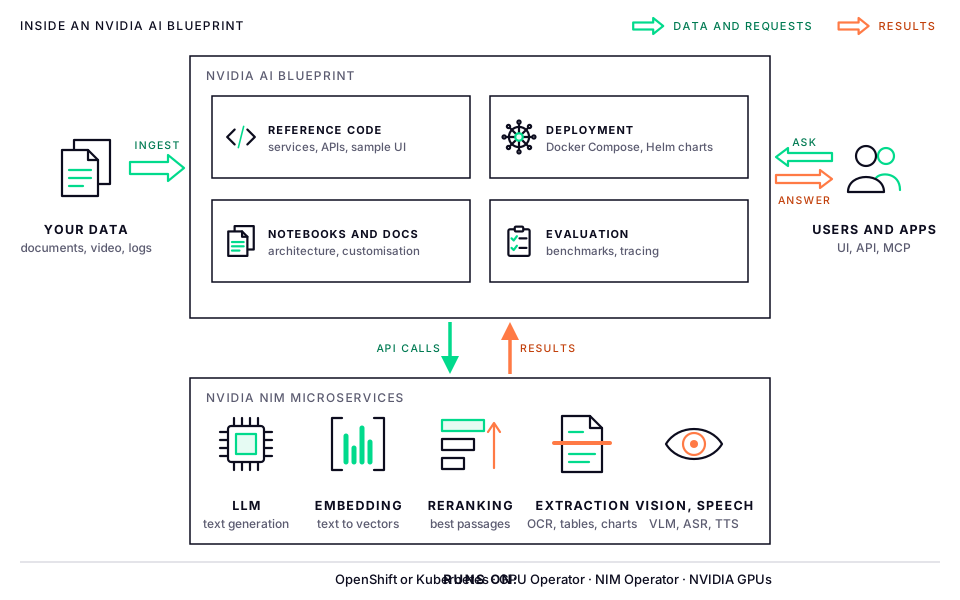
Most blueprints ship the same parts:
- Reference architecture: a diagram and description of every component and how they connect.
- Reference code: the services that orchestrate the workflow, their APIs and a sample web UI, published as open source on GitHub.
- NIM microservices: the models the workflow calls, each a container from NVIDIA's registry, nvcr.io.
- Deployment files: Docker Compose for a single GPU server, and Helm charts for Kubernetes, often using the NIM Operator to download and run the models. Some include OpenShift settings.
- Notebooks and sample data that walk through the workflow step by step.
- Customisation guides: how to swap models, change prompts, connect your data and turn features on or off.
- Evaluation and observability: benchmark and accuracy scripts, and tracing.
What a blueprint does not include matters as much: your data, security hardening, high availability, or a support agreement for the application. NVIDIA publishes blueprints "as is" as reference code, and states that securing a production deployment is the deployer's job.
The catalog
The catalog is at build.nvidia.com/blueprints. The code is on GitHub under NVIDIA-AI-Blueprints, with more from NVIDIA's Omniverse and BioNeMo teams. These are the main entries as of October 2026; the catalog changes often, so check it for the current list.
Knowledge, research and assistants
| Blueprint | What it does |
|---|---|
| RAG | Answers questions from your documents, including tables, charts and scanned pages, with citations. Many other blueprints build on it. |
| Deep Researcher Agent (formerly AI-Q) | A research agent that plans, searches enterprise sources and the web, and writes cited reports, with a quick-answer mode as well. A biomedical variant exists. |
| Nemotron voice agent | A real-time voice assistant: speech recognition, an LLM and speech synthesis, with handling for interruptions. |
| Content localisation | Translates video and audio, and syncs the speakers' lips to the translated speech. |
| PDF to podcast | Turns documents into a spoken, podcast-style summary. |
Video, signals and security
| Blueprint | What it does |
|---|---|
| Video search and summarisation (VSS) | Video analytics agents that search live or recorded video in plain language, summarise hours of footage, answer questions about what they see and verify alerts. Runs on data-centre GPUs and on Jetson and IGX Thor edge devices. |
| Streaming data to RAG | Makes live data streams searchable as they arrive. The example captures radio signals with a software-defined radio, then transcribes and indexes them. |
| Vulnerability analysis for container security | An agent that checks whether the vulnerabilities a scanner reports are really present, reachable and exploitable in a container, and documents its reasoning. |
Financial services
| Blueprint | What it does |
|---|---|
| Financial fraud detection | Trains a graph neural network on transaction data and serves fraud scores, with an explanation of each score, through Triton. |
| Transaction foundation model | Pretrains a model on transaction histories, for fraud detection, anomaly scoring and customer segmentation. |
| AI model distillation for financial data | Distils a large model into a small, cheaper one for a financial task such as classifying news. |
| Portfolio optimisation | GPU-accelerated portfolio construction and backtesting with NVIDIA cuOpt. |
| Quantitative signal discovery | An agent that generates, codes and tests trading signals. |
Industry, science and simulation
| Blueprint | What it does |
|---|---|
| Multi-agent intelligent warehouse | Governed agents that reason about and act on warehouse operations. |
| Retail | A shopping assistant, catalog enrichment from product images, and agentic commerce. |
| Earth-2 weather analytics | Weather forecasting and visualisation on NVIDIA's Earth-2 platform. |
| Digital twins | Real-time physics simulation for engineering, and the Omniverse DSX blueprint for designing AI factories. |
| Drug discovery (BioNeMo) | Generative virtual screening and protein binder design. |
Retired blueprints
Blueprints are retired too. In April 2026 NVIDIA stopped maintaining the AI virtual assistant for customer service, data flywheel and safety for agentic AI blueprints. For safety, it now points to NeMo microservices instead: NeMo Auditor, NeMo Guardrails and Safe Synthesizer. The LLM router has been superseded by the NeMo Switchyard library. Before building on a blueprint, check its README for a deprecation notice.
Which blueprints matter for us
For the sectors we work with in Bangladesh, a handful stand out:
| Sector | Start with | Typical use |
|---|---|---|
| Government | RAG, voice agent, content localisation | Assistants for policies and circulars, citizen helplines, translating public information |
| Banks | RAG, fraud detection, transaction foundation model, vulnerability analysis | Policy and compliance questions, fraud scoring, securing the container platform |
| Defence | VSS, streaming data to RAG, Deep Researcher Agent, vulnerability analysis, Earth-2 | Drone and CCTV video analysis, radio intelligence, intelligence reports, security operations, flood and cyclone forecasting |
One caution applies everywhere: test Bangla early. Most default models are tuned for English first. Check the language lists of the embedding, speech and translation models, and measure quality on real Bangla documents and audio before promising results.
Worked example: the RAG Blueprint
The RAG Blueprint is the best place to start. It is the most mature blueprint (release 2.6 at the time of writing), several other blueprints build on it, and document Q&A is the first AI project most organisations want. It implements the two pipelines described in our RAG overview.
| Part | In the RAG Blueprint |
|---|---|
| Ingestion | An ingestor service using NeMo Retriever extraction: NIMs that find page elements, charts and tables, plus Nemotron OCR for scanned pages |
| Embedding | A Llama Nemotron embedding NIM (1B parameters) |
| Vector database | Elasticsearch by default; Milvus, which can use GPU indexes, as an option |
| Reranking | A Llama Nemotron reranking NIM (1B) |
| LLM | Nemotron 3 Super, which needs two GPUs in FP8 |
| Optional | Vision-language models for images, audio ingestion, NeMo Guardrails, query decomposition, self-reflection, summarisation |
| Interfaces | A sample web UI, the RAG server and ingestor APIs, a Python library mode and an MCP server |
What it needs
| Deployment | GPUs | Notes |
|---|---|---|
| Docker Compose, all models local | 3 × H100, B200 or RTX PRO 6000 | Two GPUs for the LLM, one for everything else |
| Kubernetes or OpenShift with Helm, all models local | 8 × H100 80 GB, B200 or RTX PRO 6000 | About one GPU per NIM, plus one for each optional model; 5 × H100 with MIG slicing |
| OpenShift with the LLM from NVIDIA's hosted API | 4 to 6 | The other NIMs run locally; for development only |
| Lite mode | None | NVIDIA's hosted APIs with an embedded Milvus Lite; for laptops and learning |
Each node that runs NIMs also needs about 200 GB of free disk for model caches and images. The first Kubernetes deployment takes 60 to 70 minutes, mostly downloading models; later ones take 10 to 15 minutes.
Hosted-LLM mode sends your questions, and the passages retrieved from your documents, to NVIDIA's cloud; Lite mode sends the documents as well. That is fine for learning on public documents, and never acceptable for sovereign or classified data, where every model must run on your own GPUs.
From blueprint to production
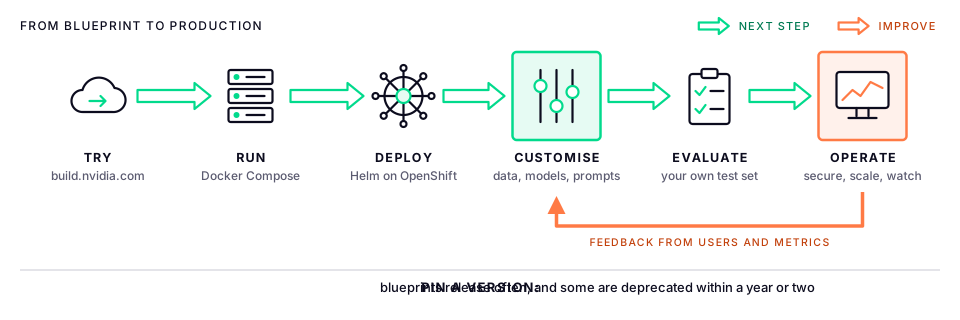
- Try it on build.nvidia.com, where many blueprints run as hosted demos, or in a Brev launchable. No hardware needed, but don't upload anything sensitive.
- Run it on one GPU server with Docker Compose, to learn how the pieces fit together.
- Deploy it on OpenShift with its Helm chart, in a project of its own.
- Customise it with your documents, models, prompts, interface and guardrails.
- Evaluate it on a test set of real questions from your users, before and after every change.
- Operate it like any production system: security, scaling, monitoring and upgrades. What users and metrics tell you drives the next round of changes.
Run it with Docker Compose
On an Ubuntu server with NVIDIA GPUs, Docker, the NVIDIA Container Toolkit and an NGC API key:
export NGC_API_KEY="nvapi-..."
echo "$NGC_API_KEY" | docker login nvcr.io -u '$oauthtoken' --password-stdin

git clone https://github.com/NVIDIA-AI-Blueprints/rag.git && cd rag
git checkout v2.6.2                                  # pin a release

mkdir -p ~/.cache/model-cache
export MODEL_DIRECTORY=~/.cache/model-cache
source deploy/compose/.env

USERID=$(id -u) docker compose -f deploy/compose/nims.yaml up -d             # the models
docker compose -f deploy/compose/vectordb.yaml up -d                         # Elasticsearch
docker compose -f deploy/compose/docker-compose-ingestor-server.yaml up -d   # ingestion
docker compose -f deploy/compose/docker-compose-rag-server.yaml up -d        # RAG server and UI
The first start downloads the models, so wait until docker ps shows the NIM containers as healthy. Then check the APIs and open the sample UI on port 8090:
curl "http://localhost:8082/v1/health?check_dependencies=true"   # ingestor
curl "http://localhost:8081/v1/health?check_dependencies=true"   # RAG server
Deploy it on OpenShift
NVIDIA publishes an OpenShift guide for the RAG Blueprint's Helm chart. For chart version 2.6 it needs:
- OpenShift 4.14 or later with GPU nodes, and the Node Feature Discovery and NVIDIA GPU operators.
- NVIDIA NIM Operator 3.0.2 or later, which downloads each model into a cache (a
NIMCacheresource) and runs it (aNIMService). - The Elastic (ECK) operator, because Elasticsearch is the default vector database.
- A default storage class with room for the model caches. In our lab that is NetApp Trident.
- An NGC API key, with the licence for each NIM accepted on build.nvidia.com, or the image pulls fail.
- A higher process limit on worker nodes. OpenShift's default of 4,096 processes per pod is too low for the ingestion and reranking services, so raise it to 16,384. The Machine Config Operator then restarts the worker nodes one at a time.
apiVersion: machineconfiguration.openshift.io/v1
kind: KubeletConfig
metadata:
  name: rag-pod-pids-limit
spec:
  machineConfigPoolSelector:
    matchLabels:
      pools.operator.machineconfiguration.openshift.io/worker: ""
  kubeletConfig:
    podPidsLimit: 16384
Then install the chart with its OpenShift values file, which creates Routes with TLS and grants the chart's service accounts the anyuid security context constraint:
export NGC_API_KEY="nvapi-..."
oc new-project rag

helm pull https://helm.ngc.nvidia.com/nvidia/blueprint/charts/nvidia-blueprint-rag-v2.6.0.tgz \
  --username '$oauthtoken' --password "$NGC_API_KEY" --untar --untardir /tmp

helm upgrade --install rag -n rag /tmp/nvidia-blueprint-rag \
  -f /tmp/nvidia-blueprint-rag/values-openshift.yaml \
  --set imagePullSecret.password="$NGC_API_KEY" \
  --set ngcApiSecret.password="$NGC_API_KEY" \
  --timeout 15m

oc secrets link nim-cache-sa ngc-secret --for=pull -n rag
For this chart version, NVIDIA's guide also patches one line in the bundled ingestion subchart before installing. Follow the guide for the exact version you deploy rather than copying commands between versions.
Watch the models download, then open the UI:
oc get nimcache,nimservice -n rag
oc get pods -n rag
echo "https://$(oc get route rag-frontend -n rag -o jsonpath='{.spec.host}')"
Things to know on OpenShift:
anyuid: several containers expect to run as a fixed user, so the chart grants theanyuidconstraint. Review this with your security team, and keep the blueprint in its own project.- Route timeouts: routes time out after 30 seconds by default, which is too short for long answers. The chart sets
haproxy.router.openshift.io/timeout: 300son the RAG server's route; add the same annotation to any route you create. - GPU taints: if your GPU nodes are tainted, add tolerations for each NIM in the values.
- Fewer GPUs while learning: set
nimOperator.nim-llm.enabled: falseto use NVIDIA's hosted LLM instead of a local one, which brings the cluster down to 4 to 6 GPUs. Public documents only.
Customising a blueprint
| To change | How | Watch out for |
|---|---|---|
| The LLM | Set APP_LLM_MODELNAME and APP_LLM_SERVERURL in the chart values, and match the NIM's NIM_SERVED_MODEL_NAME |
Prompts are tuned for the default model; rerun your test set |
| The embedding model | Set APP_EMBEDDINGS_MODELNAME, APP_EMBEDDINGS_SERVERURL and APP_EMBEDDINGS_DIMENSIONS |
Ingestion and search must use the same model, so re-ingest every document |
| The vector database | Switch from Elasticsearch to Milvus in the values | Milvus GPU indexes need a GPU; plan its storage and backups |
| Prompts | Edit the prompt configuration that ships with the RAG server | Keep prompts in Git and test every change |
| Guardrails | Turn on the NeMo Guardrails integration | Adds latency, and models of its own |
| Access control | Attach metadata such as department or classification at ingestion, and filter on it at query time | Enforce it in the retrieval call, never in the prompt |
| The interface | Replace the sample UI, or call the RAG server's API from your own application | Put single sign-on and an API gateway in front |
For example, to point the RAG server at a different LLM NIM in the cluster:
envVars:
  APP_LLM_MODELNAME: "<model name served by the NIM>"
  APP_LLM_SERVERURL: "<nim-service-name>:8000"
NIM serves an OpenAI-compatible API, so it is tempting to point the blueprint at a model served with vLLM on OpenShift AI instead. NVIDIA doesn't document that configuration, so treat it as an experiment and test it thoroughly.
In disconnected environments
Banks, government and defence networks are often air-gapped, and blueprints assume internet access in several places:
- Mirror the images: every container comes from nvcr.io, plus Elasticsearch and other open-source images. Mirror them into your internal registry with
oc-mirrororskopeo, and copy the Helm charts too. - Preload the models: NIMs download their model weights on first start. In an air-gapped network, download them on a connected machine and load them into the model caches, following NVIDIA's air-gap instructions for NIM.
- No hosted endpoints: hosted LLM mode, Lite mode and launchables all need the internet, so size the GPUs for a fully self-hosted deployment.
- Internal sources only: research agents such as the Deep Researcher search the web by default. Point them at internal sources instead.
Licensing
| Part | Licence |
|---|---|
| Blueprint code | Open source, Apache 2.0 for most blueprints; check each repository |
| NIM containers | Free for research, development and testing on up to 16 GPUs through the NVIDIA Developer Program. Production needs NVIDIA AI Enterprise, which has a 90-day trial |
| Models | Each has its own licence, such as the NVIDIA Open Model License or Meta's Llama licence |
| Third-party parts | Elasticsearch, Milvus, Redis and the rest keep their own licences |
Taking it to production
- Treat it as your code. Once you change a blueprint, you own it. NVIDIA AI Enterprise supports the NIMs and NVIDIA software underneath; the application built from the blueprint is supported by you or your integrator.
- Security review: container privileges, network policies, secrets in a vault, and scanned, signed images.
- Identity and access: single sign-on in front, per-user document filtering, and an audit log of questions and answers.
- Resilience: several replicas of the stateless services, backups of the vector database and object storage, and enough GPUs to survive losing one.
- Observability: send the traces and metrics to your existing monitoring, and track time to first token and cost per request.
- Pin versions: pin the chart, image and model versions, read the release notes before upgrading, and watch for deprecation notices.
- Evaluate continuously: run your test set on every change, as a stage in your CI/CD pipeline.
Common pitfalls
| Pitfall | What happens | Instead |
|---|---|---|
| Treating the blueprint as a product | Gaps in security, availability and support surface late | Plan the production work from day one |
| Underestimating GPUs | Pods stay Pending, or the LLM runs out of memory |
Size from NVIDIA's support matrix; use hosted mode only for learning |
| Forgetting first-start downloads | Deployments look stuck for an hour | Watch nimcache progress, and keep caches on persistent volumes |
| Changing the embedding model casually | Search quality collapses | Re-ingest after every embedding change |
| Building on a retired blueprint | No fixes or updates | Check the README and release history first |
| Assuming Bangla works | Poor answers in front of users | Test with real Bangla data early |
What's next
The hands-on labs for this topic:
- RAG Blueprint in Lite mode, to learn the APIs and the UI without GPUs, on public documents.
- RAG Blueprint on OpenShift, fully self-hosted with the NIM Operator.
- Customising it: our own documents, Milvus instead of Elasticsearch, NeMo Guardrails and a different LLM, measured with a test set.
- Video search and summarisation on the lab GPUs, with sample drone and CCTV footage.
- Deep Researcher Agent, with the RAG Blueprint connected as an enterprise source.
Related topics: NIM microservices, NeMo Retriever, vector databases, AI agents and the end-to-end chatbot.