Agentic AI: how AI agents work
What makes an AI system an agent, the reason-act-observe loop, tools and MCP, memory and planning, common design patterns, where agents fail, and how to run them safely on OpenShift.
A chatbot answers a question. A RAG assistant answers a question from your documents. An AI agent goes further: given a goal, it decides what steps to take, uses tools to take them, looks at the results, and keeps going until the job is done.
Ask a RAG assistant "what is our leave policy?" and it finds the policy and summarises it. Ask an agent "check whether Rahim has enough leave for next week, and if he does, raise the request" and it has to look up the policy, query the HR system for Rahim's balance, compare the two, and then create a request in another system. That multi-step, tool-using behaviour is what "agentic" means.
This page explains how agents work and how to build them responsibly. It builds on the RAG overview, because retrieval is usually one of an agent's tools.
Chatbot, RAG or agent?
| Chatbot | RAG assistant | Agent | |
|---|---|---|---|
| Knows | Its training data | Your documents | Your documents, systems and live data |
| Does | Answers | Answers with sources | Plans, calls tools, takes actions |
| Steps per request | One | One retrieval, one answer | Many, decided as it goes |
| Risk | Wrong answers | Wrong answers, data exposure | Wrong actions, cost and loops as well |
| Good for | Drafting, general questions | Questions about documents | Tasks that span several systems |
The agent loop
At the heart of every agent is a loop: the language model reasons about what to do next, acts by calling a tool, observes the result, and repeats until it can give a final answer. This pattern was popularised by the ReAct paper (Yao et al., 2022), short for reason and act.
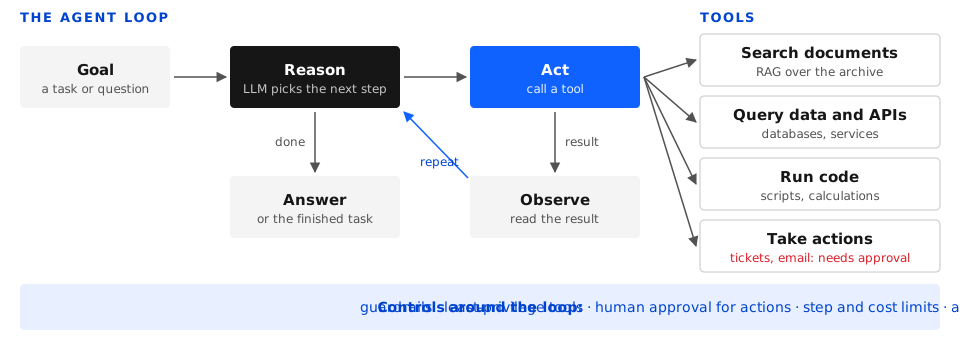
- Goal. A user request, or an event such as a new ticket or an alert.
- Reason. The LLM reads the goal, the conversation so far and the descriptions of its tools, and decides the next step: call a tool, ask the user a question, or finish.
- Act. The application runs the tool the model chose, with the arguments it supplied. The model never runs anything itself; it only asks.
- Observe. The tool's result is added to the model's context.
- Repeat until the model decides it has enough to answer, or a limit is reached.
The building blocks
The model
Not every LLM makes a good agent. The model has to choose sensible steps, produce valid tool calls, recover when a tool returns an error, and know when to stop. Look for models trained for tool calling (also called function calling) and reasoning.
- Decisions: a larger model plans better but is slower and costlier per step, and agents take many steps. A common split is a strong model for planning and smaller models for simple sub-tasks.
- In our lab: Llama and Nemotron models with tool calling, served as NIM or with vLLM on OpenShift AI.
Tools
A tool is a function the agent may call: search documents, query a database, call a REST API, run a calculation, send an email. Each tool is described to the model with a name, a plain-language description and a schema for its arguments, usually JSON Schema:
{
  "name": "get_leave_balance",
  "description": "Returns the remaining annual leave days for one employee.",
  "parameters": {
    "type": "object",
    "properties": {
      "employee_id": { "type": "string", "description": "HR employee ID, e.g. E1042" }
    },
    "required": ["employee_id"]
  }
}
The model replies with the tool name and arguments; your code validates them, runs the tool and returns the result.
- Good tools are narrow and well described.
get_leave_balance(employee_id)is safer and more reliable thanrun_sql(query). - Read tools and write tools are different. Looking something up is low risk. Creating, changing, deleting, paying or sending is not, and deserves approval steps and tighter permissions.
MCP: a standard way to connect tools
The Model Context Protocol (MCP), an open standard introduced by Anthropic in late 2024, defines one way for AI applications to discover and call tools and data sources. Instead of writing custom glue for every agent framework, you wrap a system once as an MCP server, and any MCP-capable agent can use it. It is quickly becoming the common interface between agents and enterprise systems.
Memory
- Short-term memory is the conversation and the tool results in the current context window. It is limited, so long tasks need summarising or trimming.
- Long-term memory is stored outside the model, for example in a vector database or a regular database: user preferences, past cases, facts learned in earlier sessions. The agent reads it with a retrieval tool, just like RAG.
Planning
- Step by step (ReAct): decide one step at a time from the latest result. Flexible and simple; it can wander on long tasks.
- Plan, then execute: write a full plan first, then work through it, re-planning if a step fails. More predictable on long tasks.
- Reflection: have the model (or a second model) check the result before finishing, and try again if it falls short.
Orchestration
Something has to run the loop, keep the state, enforce limits and handle errors. Frameworks such as LangGraph, LlamaIndex, CrewAI and the NVIDIA NeMo Agent Toolkit provide this, and model the agent as a graph of steps with explicit state, which makes it easier to test, resume and observe.
Common patterns
Start at the top of this list and move down only when you need to.
- Workflow with LLM steps. The steps are fixed in code; the model only does the parts that need language, such as classifying a ticket or drafting a reply. Predictable, cheap and easy to test. Many "agent" problems are best solved this way.
- Router. The model reads the request and sends it to the right workflow, tool or specialist.
- Single agent with tools. One model in the loop with a handful of tools. The workhorse of practical agents.
- Agentic RAG. Retrieval becomes a tool the agent controls: it decides when to search, rewrites the query, searches again if the first results are poor, and combines several sources before answering.
- Plan and execute. A planner breaks a large task into steps; an executor carries them out.
- Multi-agent. A supervisor agent hands sub-tasks to specialist agents, each with its own tools and instructions, for example a researcher, an analyst and a writer. Powerful for complex tasks, but harder to debug and more expensive.
When to use an agent, and when not
Use an agent when the steps genuinely depend on what is found along the way, the task spans several systems, and a person currently does it by clicking through screens and copying between them.
Don't use an agent when the steps are always the same (write a workflow), a single retrieval answers the question (use RAG), or a mistake would be costly and can't be reviewed before it happens.
Where agents go wrong
| Problem | What it looks like | Mitigation |
|---|---|---|
| Loops | Calls the same tool again and again, never finishing | Step limits, loop detection, a clear stop condition |
| Wrong tool or bad arguments | Calls a tool that doesn't fit, or invents an ID | Fewer, better-described tools; validate arguments; return clear errors |
| Error spiral | One failed step leads to guesses that compound | Make tools fail loudly; let the agent ask the user |
| Prompt injection | A document, web page or email the agent reads contains instructions, and the agent follows them | Treat all tool output as untrusted data; limit what tools can do; require approval for actions |
| Over-reach | Takes an action nobody asked for | Least-privilege tools; human approval for writes |
| Cost and latency | A simple request takes 20 model calls | Budgets per task, smaller models for simple steps, workflows where possible |
Keeping agents safe
The more an agent can do, the more its controls matter.
- Least privilege. Give each agent only the tools it needs, with credentials scoped to the user it acts for. An agent should never be able to do more than the person using it.
- Human in the loop. Require approval before any action that changes, sends, pays or deletes. Show the person exactly what will happen.
- Limits. Cap steps, tokens, time and cost per task.
- Sandboxing. Run generated code in an isolated container with no network or secrets access.
- Guardrails. Check inputs and outputs for off-topic requests, jailbreaks and sensitive data (NeMo Guardrails).
- Audit. Log every step: the model's decision, each tool call with its arguments and result, and every approval.
Evaluating agents
An agent can reach a correct answer by a bad route, or a wrong answer by a sensible one, so evaluate both:
- Task success rate: on a set of realistic tasks, how often is the outcome correct?
- Trajectory: did it call the right tools, in a sensible order, without wasted steps?
- Tool-call accuracy: were the tool names and arguments valid?
- Safety: did it ever attempt an action it shouldn't, or follow injected instructions? Include adversarial test cases.
- Cost and latency: model calls, tokens and seconds per task.
Running agents on OpenShift
Agents are distributed applications, and OpenShift gives them what they need:
- Model serving: tool-calling LLMs on GPUs with NIM or vLLM in OpenShift AI.
- Tools as services: each tool is a small microservice or MCP server, deployed, scaled and secured like any other workload.
- API gateway and identity: expose tools through an API gateway (WSO2 API Manager) and pass the user's identity through (WSO2 Identity Server), so every call is authorised as that user.
- Events: start agents from events, such as a new Kafka message, ticket or alert, not only from chat.
- Observability: trace every reasoning step and tool call end to end with OpenTelemetry.
- Isolation: separate namespaces, network policies and service accounts per agent.
Our lab stack
| Building block | What we use |
|---|---|
| Platform | Red Hat OpenShift and OpenShift AI |
| LLM | Llama and Nemotron NIM with tool calling, vLLM |
| Orchestration | LangGraph, NVIDIA NeMo Agent Toolkit |
| Tools | Microservices and MCP servers on OpenShift |
| Retrieval tool | The RAG pipeline: NeMo Retriever NIMs with Milvus or pgvector |
| Memory | Milvus or pgvector for long-term memory, Redis for session state |
| Gateway and identity | WSO2 API Manager and Identity Server |
| Guardrails | NeMo Guardrails |
| Observability | OpenTelemetry tracing |
What's next
The hands-on labs in this series:
- A first agent: one tool-calling model with two tools, a document search and a calculator, running the loop by hand in a notebook so every step is visible.
- Agentic RAG: turning the RAG pipeline into a tool the agent controls.
- Tools as MCP servers: wrapping an internal API as an MCP server on OpenShift.
- Human approval: an agent that drafts an action and waits for sign-off before running it.
- Guardrails and tracing: adding NeMo Guardrails and OpenTelemetry to the agent, then moving it into the production chatbot.