RAG: retrieval-augmented generation explained
What RAG is, how its two pipelines work, the building blocks and the decisions behind each, where it goes wrong, and the stack we use for it in our OpenShift lab.
A large language model only knows what was in its training data. It has never seen your policies, manuals, contracts or tickets, and what it does know stops at its training date. Ask it about your own organisation and it will either say it doesn't know or, worse, invent a confident answer.
Retrieval-augmented generation (RAG) fixes this without retraining the model. Before the model answers, the system retrieves the passages from your own documents that are most relevant to the question and puts them in the prompt. The model then generates its answer from that text and can cite where each fact came from.
The idea was named in a 2020 paper from Facebook AI Research (Lewis et al.) and has since become the standard way to put an LLM to work on private data.
Why RAG
- Private knowledge. The model can answer from documents it was never trained on.
- Fresh answers. Update the documents and the answers change the same day. No retraining.
- Fewer made-up answers. The model is told to answer only from the retrieved text, and to say so when the text doesn't contain the answer.
- Citations. Every answer can point back to its source document and page, so people can check it.
- Access control. Retrieval can be filtered by who is asking, so users only get answers from documents they are allowed to read.
- Data stays home. With self-hosted models and a self-hosted vector database, nothing leaves your network.
How it works: two pipelines
A RAG system is really two pipelines that share one database.
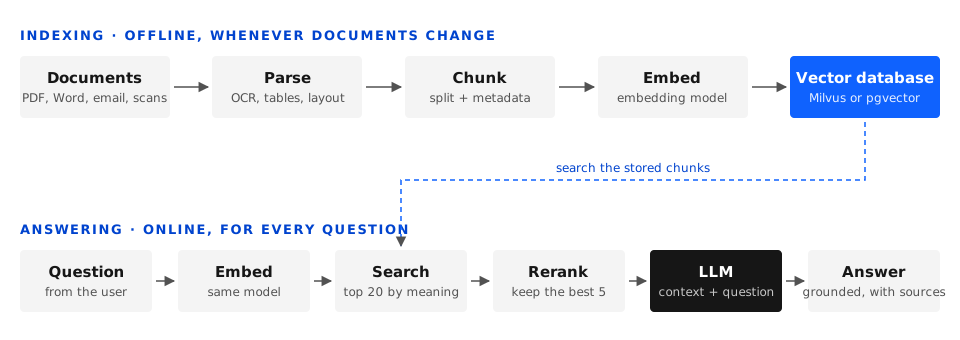
Indexing runs offline, whenever documents are added or changed:
- Parse each document into clean text, including scanned pages (OCR) and tables.
- Chunk the text into passages of a few hundred words, keeping metadata such as source, page and classification with each chunk.
- Embed each chunk: an embedding model turns the text into a vector, a list of numbers that captures its meaning.
- Store the vectors and their text and metadata in a vector database.
Answering runs online, for every question:
- Embed the question with the same embedding model.
- Search the vector database for the chunks whose vectors are closest to the question's, typically the top 20.
- Rerank those candidates with a more precise model and keep the best 3 to 5.
- Prompt the LLM with the question, the chosen chunks and instructions to answer only from them and cite them.
- Answer, with links back to the source passages.
The building blocks
Parsing
Most RAG quality problems start here. A PDF is a page layout, not a text file: multi-column pages, headers and footers, tables and scanned images all have to be turned into clean, correctly ordered text. A table flattened into a jumble of numbers can't be retrieved or understood.
- Decisions: OCR for scans, table extraction, how to handle images and charts, and which languages to support. Bangla OCR needs to be tested specifically.
- In our lab: NeMo Retriever extraction NIMs, or Docling.
Chunking
The model can't take a whole library in its prompt, and retrieval works best on focused passages, so documents are split into chunks.
- Size: small chunks (around 200 tokens) match questions precisely but lose context; large chunks (1,000 tokens or more) keep context but dilute the match. 300 to 800 tokens with 10 to 20 percent overlap is a common starting point.
- Structure-aware splitting: splitting on headings, sections and paragraphs beats cutting every N characters, because a chunk should be about one thing.
- Metadata: store the source file, page, section heading, date and access level with every chunk. You will need them for citations and filtering.
Embeddings
An embedding model maps text to a vector, typically a few hundred to a few thousand numbers, so that passages with similar meaning end up close together. "How do I reset my password?" and "steps to recover account access" share few words but land near each other.
- Decisions: model quality on your kind of text, language support, vector size (bigger means more storage and slower search), and speed.
- Rule: documents and questions must be embedded with the same model. Changing the model means re-indexing everything.
- In our lab: the NeMo Retriever embedding NIM.
Vector database
A vector database stores the vectors and finds the nearest ones to a query vector quickly. Comparing against every vector is exact but slow, so these databases use approximate nearest-neighbour (ANN) indexes such as HNSW or IVF, which trade a little accuracy for a lot of speed.
- Metadata filtering: search only chunks the user may see, or only documents from one department or year.
- Hybrid search: combine vector search with classic keyword search (BM25). Keywords catch exact terms such as part numbers, names and acronyms that embeddings can miss.
- In our lab: Milvus, a dedicated vector database that can use GPU indexes, and pgvector, which adds vector search to PostgreSQL. pgvector is simpler to run if you already operate Postgres; Milvus scales further.
Reranking
Vector search is fast but rough. A reranker reads the question and each candidate chunk together and scores how well the chunk actually answers it. It is too slow to run over the whole database but ideal for reordering the top 20 or so. Adding a reranker is often the single cheapest improvement to answer quality.
- In our lab: the NeMo Retriever reranking NIM.
Prompt and generation
The final prompt holds a system instruction, the retrieved chunks with their sources, and the user's question. A typical instruction: answer only from the context below, cite the source of each fact, and say you don't know if the context doesn't contain the answer.
- Decisions: which LLM (bigger is more accurate but slower and costlier), how many chunks to include, and how to format citations.
- In our lab: Llama and Nemotron models served as NIM, or vLLM on OpenShift AI.
RAG, fine-tuning or long context?
| Approach | Best for | Weak at |
|---|---|---|
| RAG | Facts from private or changing documents, with citations and access control | Questions that need reasoning across the whole collection at once |
| Fine-tuning | Teaching a style, format, vocabulary or task behaviour | Adding facts that change; it can't cite sources and is costly to update |
| Long context | A small, fixed set of documents that fits in the prompt | Large collections; cost and latency grow with every token |
They combine well. A common pattern is a model fine-tuned on your terminology, answering through RAG.
Where RAG goes wrong
| Symptom | Likely cause | First thing to try |
|---|---|---|
| The right document exists but the answer says "I don't know" | Retrieval missed it: bad parsing, chunks too large, or the wording differs too much | Inspect the retrieved chunks; add hybrid search or query rewriting |
| The answer mixes up facts from different documents | Chunks are too small or have lost their context | Larger or structure-aware chunks; include the section heading in each chunk |
| The answer is confidently wrong | The model ignored the context, or the context was wrong | Stricter prompt, a reranker, a groundedness check |
| Tables and numbers come out garbled | Parsing flattened the table | Better table extraction; store tables as Markdown |
| Answers are slow | Too many chunks, a large model, or no GPU for embedding | Fewer, better chunks after reranking; a smaller or quantised model |
| A user sees content they shouldn't | No access filtering at retrieval time | Filter by the user's permissions before the LLM sees anything |
The golden rule: when an answer is bad, look at what was retrieved first. Most failures are retrieval failures, not model failures.
Measuring quality
You can't improve what you don't measure. Build a test set of 50 to 100 real questions with known answers and the documents that contain them, then measure both halves:
- Retrieval: did the right chunk come back? Recall@k is the share of questions whose correct chunk is in the top k results.
- Answers: is the answer faithful to the retrieved text (no invented facts), relevant to the question, and correct against the known answer?
Tools such as RAGAS and NeMo Evaluator automate these scores, partly by using an LLM as a judge. Run the test set after every change to chunking, models or prompts.
Production concerns
- Security: enforce access control at retrieval time, log every question and answer for audit, and treat retrieved documents as untrusted input that could carry prompt-injection text.
- Guardrails: keep the assistant on its approved topics, block jailbreak attempts and check that answers are grounded in the context (NeMo Guardrails).
- Freshness: re-index changed documents incrementally rather than rebuilding everything. Change data capture (Kafka and Debezium) can trigger it.
- Observability: trace each request through embedding, search, reranking and generation with OpenTelemetry, so you can see where time and quality are lost.
- Cost and capacity: embedding and reranking models are small and run well on modest GPUs; the LLM is usually the biggest consumer.
Our lab stack
| Building block | What we use |
|---|---|
| Platform | Red Hat OpenShift and OpenShift AI |
| Parsing | NeMo Retriever extraction NIMs, Docling |
| Embedding | NeMo Retriever embedding NIM |
| Vector database | Milvus and pgvector |
| Reranking | NeMo Retriever reranking NIM |
| LLM | Llama and Nemotron NIM, vLLM |
| Orchestration | LangChain or LlamaIndex, and the NVIDIA RAG Blueprint |
| Evaluation | RAGAS, NeMo Evaluator |
| Guardrails | NeMo Guardrails |
What's next
The hands-on labs in this series build on this overview:
- Minimal RAG: a few dozen PDFs, pgvector and a Llama NIM in an OpenShift AI workbench, with one cited answer working end to end.
- Vector databases: the same pipeline on Milvus and pgvector, compared.
- Retrieval quality: adding the NeMo Retriever reranking NIM and measuring the difference.
- Guardrails: topic, safety and jailbreak rails with NeMo Guardrails.
- End to end: a production chatbot on OpenShift.