DevOps and CI/CD: the complete guide
What DevOps is, how CI/CD pipelines work stage by stage, GitOps and deployment strategies, security in the pipeline, and how to build it all with open-source tools and on Red Hat OpenShift.
Most organisations don't struggle to write software. They struggle to get it into production safely. A change that takes a developer a day can wait weeks for a release window, a manual deployment checklist and a weekend of overtime, and then fail because the server wasn't set up quite like the test one.
DevOps is the way of working that fixes this. Development and operations share responsibility for the whole path from code to production, and automate it, so that changes go out in small, frequent, low-risk steps. CI/CD pipelines are the automation at the centre of it.
This guide covers the ideas first, then the pipeline in detail, then two ways to build it: with open-source tools on any infrastructure, and on Red Hat OpenShift.
What DevOps is
The term came out of the first DevOpsDays conference in Ghent in 2009. It names a reaction against the "wall" between developers, who are rewarded for change, and operations, who are rewarded for stability. Over the wall, each side blames the other, and releases become rare, large and risky.
DevOps is three things together:
- Culture: one team owns a service from code to production ("you build it, you run it"). Failures are reviewed without blame, to fix the system rather than the person.
- Practices: small changes, version control for everything, automated testing, continuous integration and delivery, infrastructure as code, and monitoring.
- Tools: the platform that makes the practices cheap: Git, pipelines, container registries, Kubernetes, observability.
Buying the tools without changing the culture and practices is the most common way DevOps projects fail.
The DevOps loop
Work flows round a continuous loop: plan → code → build → test → release → deploy → operate → monitor, and what monitoring shows feeds the next round of planning. The goal is to go round that loop quickly and often, because a small change is easy to test, easy to understand and easy to roll back.
Core practices
| Practice | What it means | Why it matters |
|---|---|---|
| Everything in version control | Code, tests, pipeline definitions, infrastructure, configuration, database migrations | One source of truth; every change reviewed and traceable |
| Continuous integration | Developers merge to the main branch at least daily; every change is built and tested automatically | Problems surface in minutes, not at release time |
| Continuous delivery | Every change that passes the pipeline is ready to release with one click | Releasing becomes routine, not an event |
| Infrastructure as code | Servers, networks and clusters defined in files and created by tools | Environments are identical and can be rebuilt |
| Automated testing | Unit, integration, security and performance tests run in the pipeline | Confidence to change things quickly |
| Monitoring and feedback | Metrics, logs, traces and alerts on every service | You see problems before users report them |
| Small batches | Ship small changes often, behind feature flags if needed | Less risk per release, faster rollback |
CI, continuous delivery and continuous deployment
The "CD" in CI/CD means one of two things, and the difference matters for regulated organisations.
| Continuous integration | Continuous delivery | Continuous deployment | |
|---|---|---|---|
| What is automated | Build and test on every change | Everything up to production | Everything, including production |
| Production release | Manual, separate process | One click, after approval | Automatic when all checks pass |
| Suits | Every team, as a first step | Banks, government and most enterprises | Web products with strong test coverage |
Most of our clients aim for continuous delivery: fully automated up to production, with a recorded human approval for the final step, which also satisfies change-management and audit rules.
Anatomy of a CI/CD pipeline
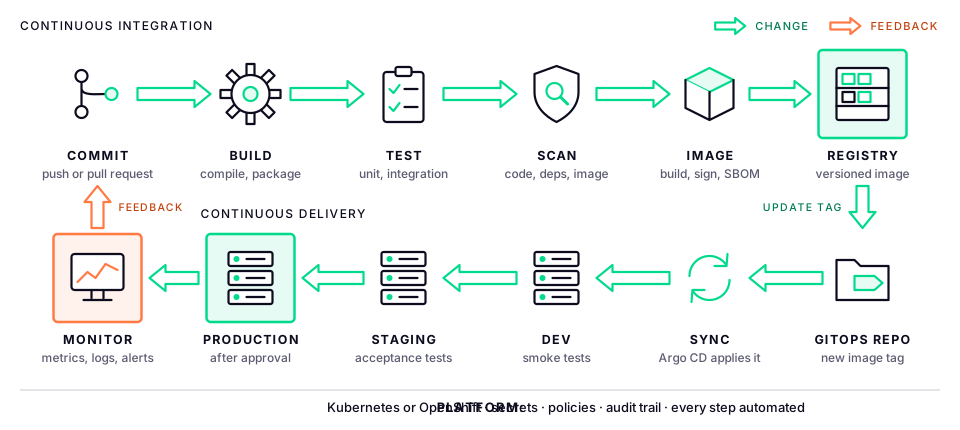
| Stage | What happens | Typical tools |
|---|---|---|
| Commit | A developer pushes a branch or opens a pull request; the pipeline starts from a webhook | Git, GitLab, Gitea, GitHub |
| Build | Compile the code and resolve dependencies from an internal repository | Maven, Gradle, npm, dotnet |
| Test | Unit tests, then integration tests against real databases in containers | JUnit, pytest, xUnit, Testcontainers |
| Scan | Code quality and security analysis, vulnerable dependencies, secrets in code | SonarQube, Trivy, Gitleaks |
| Image | Build the container image, scan it, sign it and record what is in it (an SBOM) | Buildah, Kaniko, cosign, Syft |
| Registry | Push the image with a unique, immutable tag such as the Git commit ID | Harbor, Quay, Nexus |
| GitOps repo | Update the image tag in the deployment manifests for the target environment | Kustomize, Helm |
| Sync | A GitOps controller notices the change and applies it to the cluster | Argo CD, Flux |
| Promote | Run smoke and acceptance tests in each environment; production needs approval | The pipeline tool, pull request approval |
| Monitor | Watch error rates, latency and business metrics; roll back if they degrade | Prometheus, Grafana, OpenTelemetry |
Rules that make pipelines work
- Build once, deploy many. The exact image that passed testing is the one that reaches production. Never rebuild for each environment.
- Keep configuration out of the image. Environment differences (URLs, sizes, feature flags) live in ConfigMaps, Secrets or Helm values, not in the code.
- Fail fast. Run the quickest checks first, so developers get feedback in minutes.
- The pipeline is code. Define it in a file in the repository, review changes to it like any other code.
- No manual steps in the middle. Every manual step is a place where releases wait and mistakes happen. The only manual step should be the approval.
- Secrets never in Git. Use a secrets manager such as HashiCorp Vault or OpenBao, or encrypted Sealed Secrets.
GitOps: deploying from Git
Older pipelines push to production: the CI server holds cluster credentials and runs kubectl apply or helm upgrade. GitOps reverses this. The desired state of every environment is stored in a Git repository, and a controller inside the cluster pulls that state and keeps the cluster matching it.
- Audit trail for free: every change to production is a Git commit, with an author, a reviewer and a timestamp.
- Rollback is
git revert. - Drift detection: if someone changes the cluster by hand, the controller shows it and can undo it.
- Fewer credentials: the CI system no longer needs access to production clusters.
- Disaster recovery: point a new cluster at the same repository and it rebuilds the applications.
A common layout is one repository for application code and a separate one for deployment configuration, with a folder or branch per environment. The CI pipeline ends by opening a pull request that changes the image tag; merging it is the release.
Deployment strategies
| Strategy | How it works | Rollback | Cost |
|---|---|---|---|
| Recreate | Stop the old version, start the new | Redeploy the old version, with downtime | Lowest |
| Rolling | Replace pods a few at a time (the Kubernetes default) | Roll back the deployment | Low |
| Blue-green | Run the new version beside the old, then switch all traffic at once | Switch traffic back instantly | Double capacity during the switch |
| Canary | Send a small share of traffic to the new version, watch it, then increase | Send all traffic back to the old version | Needs traffic splitting and good metrics |
Database changes need the most care: make them backward compatible (add a column before the code uses it, remove it a release later), so the old and new versions can run at the same time.
DevSecOps: security in the pipeline
Security checks used to happen at the end, as a gate before release. In DevSecOps they run in the pipeline on every change, when problems are cheapest to fix.
- Static analysis (SAST) of the source code for security flaws.
- Dependency scanning (SCA) for libraries with known vulnerabilities.
- Secret detection to stop keys and passwords being committed.
- Image scanning of the container image and its base layers.
- SBOM: a software bill of materials, listing every component in the image, so you can find affected services the day a new vulnerability is announced.
- Signing: sign images in the pipeline (Sigstore cosign), and let the cluster run only signed images from trusted registries.
- Admission policies: reject deployments that run as root, lack resource limits or use images with critical vulnerabilities (Kyverno, OPA Gatekeeper, or Advanced Cluster Security on OpenShift).
- Dynamic testing (DAST) of the running application in staging (OWASP ZAP).
Together these protect the software supply chain: proof that what runs in production was built from reviewed code by your pipeline, and nothing else.
Building it with open-source tools
Every part of a CI/CD platform has a mature open-source option. This is a typical self-managed stack on upstream Kubernetes or virtual machines:
| Need | Open-source options |
|---|---|
| Source control | GitLab Community Edition, Gitea or Forgejo |
| CI engine | Jenkins, GitLab CI, Tekton, Woodpecker |
| Artifact repository | Sonatype Nexus Repository, Apache Archiva |
| Container registry | Harbor (with built-in Trivy scanning) |
| Code quality | SonarQube Community Build |
| Security scanning | Trivy, Grype, Gitleaks, OWASP ZAP |
| Signing and SBOM | Sigstore cosign, Syft |
| GitOps | Argo CD, Flux |
| Secrets | OpenBao or HashiCorp Vault, Sealed Secrets, External Secrets Operator |
| Policy | Kyverno, OPA Gatekeeper |
| Infrastructure as code | Ansible, OpenTofu (the open-source fork of Terraform) |
| Observability | Prometheus, Grafana, Loki, OpenTelemetry, Jaeger |
A CI pipeline in GitLab CI, for a Java service, looks like this:
# .gitlab-ci.yml
stages: [build, test, scan, image, deploy]

build:
  stage: build
  image: maven:3.9-eclipse-temurin-21
  script: mvn -B package -DskipTests
  artifacts:
    paths: [target/*.jar]

test:
  stage: test
  image: maven:3.9-eclipse-temurin-21
  script: mvn -B verify

scan:
  stage: scan
  image: aquasec/trivy:latest
  script: trivy fs --exit-code 1 --severity CRITICAL .

image:
  stage: image
  image: quay.io/buildah/stable
  script:
    - buildah bud -t $REGISTRY/shop/orders:$CI_COMMIT_SHORT_SHA .
    - buildah push $REGISTRY/shop/orders:$CI_COMMIT_SHORT_SHA

deploy-dev:
  stage: deploy
  image: alpine/git
  script:
    # Update the image tag in the GitOps repo; Argo CD does the rest.
    - git clone https://$GITOPS_TOKEN@git.example.local/shop/deploy.git
    - cd deploy/envs/dev && sed -i "s/newTag: .*/newTag: $CI_COMMIT_SHORT_SHA/" kustomization.yaml
    - git commit -am "orders $CI_COMMIT_SHORT_SHA to dev" && git push
And Argo CD watches the deployment repository:
apiVersion: argoproj.io/v1alpha1
kind: Application
metadata:
  name: orders-dev
  namespace: argocd
spec:
  project: default
  source:
    repoURL: https://git.example.local/shop/deploy.git
    targetRevision: main
    path: envs/dev
  destination:
    server: https://kubernetes.default.svc
    namespace: shop-dev
  syncPolicy:
    automated:
      prune: true
      selfHeal: true
The trade-off: everything is free to use and you control every piece, but you integrate, secure, upgrade and support a dozen separate products yourself, along with the Kubernetes distribution under them. That takes a dedicated platform team.
Building it on OpenShift
OpenShift includes most of that stack as supported, integrated operators, installed from OperatorHub and upgraded with the cluster. Most are upstream open-source projects packaged and supported by Red Hat.
| Need | On OpenShift | Upstream project |
|---|---|---|
| CI pipelines | OpenShift Pipelines | Tekton |
| GitOps | OpenShift GitOps | Argo CD |
| Image builds | Builds for OpenShift, source-to-image (S2I), Buildah | Shipwright, Buildah |
| Registry | Built-in image registry, Red Hat Quay | Quay, Clair |
| Security and policy | Red Hat Advanced Cluster Security | StackRox |
| Signing and SBOM | Red Hat Trusted Artifact Signer, Trusted Profile Analyzer | Sigstore, Trustify |
| Developer portal | Red Hat Developer Hub | Backstage |
| Cloud IDE | OpenShift Dev Spaces | Eclipse Che |
| Deployment strategies | Routes with weighted traffic, OpenShift Service Mesh | Istio, Argo Rollouts |
| Observability | Built-in monitoring, logging, distributed tracing | Prometheus, Loki, Tempo, OpenTelemetry |
What OpenShift adds
- One supported platform: the pipeline tools, registry, security and cluster are tested together and upgraded together, with one vendor to call.
- Pipelines that run as pods: each Tekton step runs in a container on the cluster, so there is no central CI server to scale or patch, and builds use cluster capacity only while they run.
- Secure by default: containers run as non-root under security context constraints, and builds with Buildah need no privileged Docker daemon.
- Developer experience: the web console shows pipelines, topology and logs, and Developer Hub gives teams templates that create a repository, pipeline and GitOps configuration for a new service in minutes.
- Disconnected install: all of it works in air-gapped environments from a mirrored registry, which matters for banks, government and defence.
An OpenShift Pipelines example
A Tekton pipeline that clones the code, builds and pushes an image, and updates the GitOps repository. It reuses tasks that ship with OpenShift Pipelines in the openshift-pipelines namespace:
apiVersion: tekton.dev/v1
kind: Pipeline
metadata:
  name: orders-ci
spec:
  params:
    - name: git-url
    - name: git-revision
      default: main
    - name: image
  workspaces:
    - name: source
  tasks:
    - name: clone
      taskRef:
        resolver: cluster
        params:
          - { name: kind, value: task }
          - { name: name, value: git-clone }
          - { name: namespace, value: openshift-pipelines }
      params:
        - { name: URL, value: $(params.git-url) }
        - { name: REVISION, value: $(params.git-revision) }
      workspaces:
        - { name: output, workspace: source }

    - name: build-image
      runAfter: [clone]
      taskRef:
        resolver: cluster
        params:
          - { name: kind, value: task }
          - { name: name, value: buildah }
          - { name: namespace, value: openshift-pipelines }
      params:
        - { name: IMAGE, value: "$(params.image):$(tasks.clone.results.COMMIT)" }
      workspaces:
        - { name: source, workspace: source }

    - name: update-gitops
      runAfter: [build-image]
      taskRef:
        name: update-image-tag # a small custom task that commits the new tag
      params:
        - { name: tag, value: $(tasks.clone.results.COMMIT) }
Parameter names of the shipped tasks can change between OpenShift Pipelines versions, so check them with tkn task describe -n openshift-pipelines buildah. A Tekton Trigger starts the pipeline from a Git webhook, and OpenShift GitOps then deploys the new tag exactly as in the open-source example above.
Open source or OpenShift?
| Self-assembled open source | OpenShift | |
|---|---|---|
| Licence cost | None | Subscription per core |
| Integration effort | High: you choose, connect and test every piece | Low: operators install and configure the stack |
| Upgrades | Each tool on its own schedule, compatibility is yours to check | Tested together, upgraded with the cluster |
| Support | Community, or separate vendors per tool | One vendor, with long-term support |
| Security baseline | You design it | Non-root containers, SCCs, ACS, signed images |
| Team needed | A strong platform team | A smaller platform team |
| Best for | Teams with deep skills and freedom to choose | Regulated enterprises that need support, audit and stability |
The two aren't exclusive. Jenkins or GitLab often stay as the CI engine while OpenShift GitOps handles deployment, and the concepts and YAML carry over in both directions.
In disconnected environments
Banks, government and defence networks are often air-gapped, and every part of the pipeline has to work without the internet:
- Mirror everything: container base images, operator catalogs and Tekton task images into an internal registry.
- Proxy dependencies: Maven, npm, NuGet and PyPI packages through an internal Nexus repository that is synced through an approved transfer process.
- Internal Git and webhooks: self-hosted GitLab or Gitea inside the network.
- Vulnerability data: scanners need their databases updated offline, on a schedule.
Measuring success: the DORA metrics
The DORA research programme (DevOps Research and Assessment, now part of Google Cloud) found four metrics that separate high-performing teams from the rest:
| Metric | Question | Elite teams |
|---|---|---|
| Deployment frequency | How often do we release to production? | On demand, many times a day |
| Lead time for changes | How long from commit to production? | Less than a day |
| Change failure rate | What share of releases cause a failure? | Low: well under 15 percent |
| Time to restore | How fast do we recover from a failure? | Less than an hour |
The first two measure speed and the last two measure stability. The research's key finding is that the best teams are better at both: speed and stability come from the same practices.
A roadmap for adoption
- Version control everything and agree a branching model, ideally trunk-based with short-lived branches.
- Automate the build and unit tests on every pull request. This is continuous integration.
- Containerise the application and push versioned images to a registry.
- Automate deployment to a dev environment with GitOps.
- Add security scanning and integration tests to the pipeline.
- Promote through staging to production with one approval step, and record it.
- Add monitoring, alerts and the DORA metrics, and review them each month.
- Scale out with templates in a developer portal, so every new service starts with a working pipeline.
Start with one willing team and one service, prove the improvement in lead time and failure rate, then spread it.
What's next
The rest of this series goes hands-on, each lab building on the last:
- Source control and branching and continuous integration basics.
- Building container images with Buildah and source-to-image.
- The same pipeline three ways: Jenkins, GitLab CI and OpenShift Pipelines.
- OpenShift GitOps for dev, staging and production, then deployment strategies.
- DevSecOps, infrastructure as code, Developer Hub and measuring DevOps.
The .NET microservices lab is a good application to run through these pipelines.