Microservices with .NET on OpenShift
Build three .NET 10 microservices that talk over HTTP and Kafka, each with its own PostgreSQL database, then containerise them on Red Hat UBI images and deploy them to OpenShift with health probes, autoscaling and OpenTelemetry.
In this lab you build ShopLite, a small ordering system made of three .NET 10 services, run it on your laptop, and then deploy it to OpenShift. On the way you'll meet the patterns that every real microservices system needs: one database per service, synchronous calls that survive failures, asynchronous events, health probes, configuration from the platform, and tracing.
The code is deliberately small (under 250 lines of C#) so that the patterns stay visible. Every command and file on this page was built and tested on .NET 10 and OpenShift 4.22 in our lab.
What you'll build
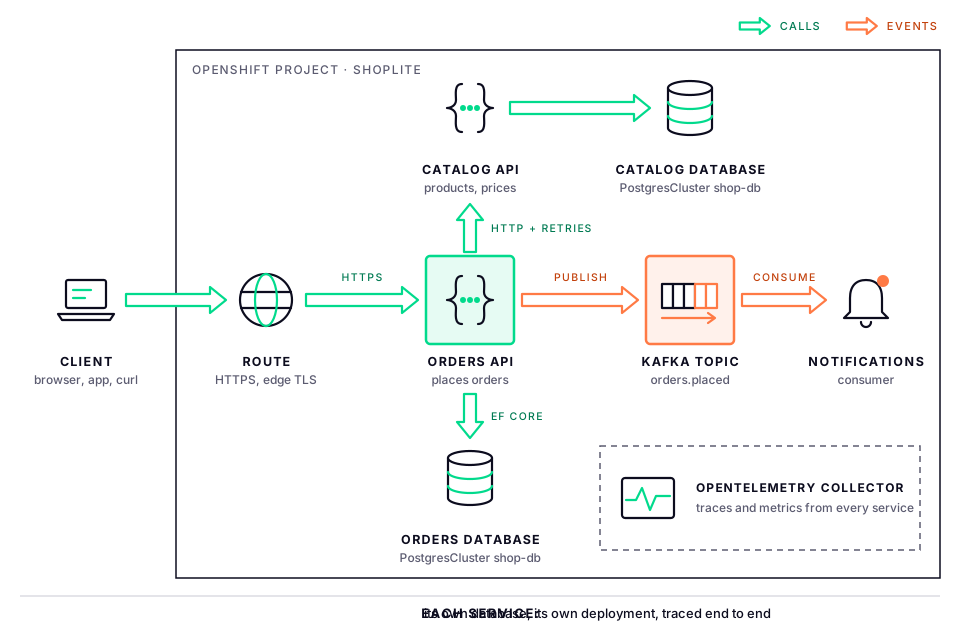
| Service | What it does | Talks to |
|---|---|---|
| Catalog API | Lists products and their prices | Its own catalog database |
| Orders API | Accepts orders, prices them from the catalog, stores them | Catalog API (HTTP), its own orders database, Kafka |
| Notifications | Sends an order confirmation for every new order (in the lab, it logs one) | Kafka |
The flow for one order:
- A client posts
{"productId": 2, "quantity": 3}to the Orders API. - Orders asks Catalog for product 2 over HTTP. If Catalog is slow or briefly down, the call is retried automatically.
- Orders saves the order in its own database and publishes an
OrderPlacedevent to Kafka. - Notifications, which knows nothing about Orders, reads the event and sends the confirmation.
Before you split: is this a microservices problem?
Microservices trade simple code for a harder platform. Each service is deployed, scaled and owned on its own, but you now have a network between your components, several databases to keep consistent and many more things to monitor.
They pay off when several teams need to release independently, parts of the system have very different load (orders spike on payday, the catalog barely changes), or parts need different technology or availability.
Start with a modular monolith when one team owns everything, the domain is still changing shape, or you have no platform for containers, CI/CD and observability yet. A well-structured .NET monolith with clear module boundaries can be split later; a badly split system is very hard to merge back.
Prerequisites
- .NET 10 SDK on your workstation (
dotnet --versionshows10.0.x) - Podman (or Docker) to run PostgreSQL and Kafka locally
- An OpenShift 4.x cluster with the
ocCLI, and these operators installed by an administrator:- Crunchy Postgres for Kubernetes (PostgreSQL)
- Streams for Apache Kafka (Kafka, based on Strimzi)
- Optionally, Red Hat build of OpenTelemetry and Tempo for tracing
- The cluster can pull from
registry.access.redhat.com(in a disconnected cluster, mirror the UBI .NET images first)
Step 1: Create the solution
mkdir shoplite && cd shoplite
dotnet new sln -n ShopLite
dotnet new classlib -o src/ServiceDefaults
dotnet new web -o src/Catalog.Api
dotnet new web -o src/Orders.Api
dotnet new web -o src/Notifications
dotnet sln add src/ServiceDefaults src/Catalog.Api src/Orders.Api src/Notifications
for p in Catalog.Api Orders.Api Notifications; do
  dotnet add src/$p reference src/ServiceDefaults
done
rm src/ServiceDefaults/Class1.cs
Add the NuGet packages:
# Shared plumbing: resilience and OpenTelemetry
dotnet add src/ServiceDefaults package Microsoft.Extensions.Http.Resilience
dotnet add src/ServiceDefaults package OpenTelemetry.Extensions.Hosting
dotnet add src/ServiceDefaults package OpenTelemetry.Instrumentation.AspNetCore
dotnet add src/ServiceDefaults package OpenTelemetry.Instrumentation.Http
dotnet add src/ServiceDefaults package OpenTelemetry.Exporter.OpenTelemetryProtocol

# Data access for the two services that own data
for p in Catalog.Api Orders.Api; do
  dotnet add src/$p package Npgsql.EntityFrameworkCore.PostgreSQL
  dotnet add src/$p package Microsoft.Extensions.Diagnostics.HealthChecks.EntityFrameworkCore
done

# Kafka client for the producer and the consumer
dotnet add src/Orders.Api package Confluent.Kafka
dotnet add src/Notifications package Confluent.Kafka
ServiceDefaults is a class library, but it configures ASP.NET Core, so add a framework reference to src/ServiceDefaults/ServiceDefaults.csproj:
<ItemGroup>
  <FrameworkReference Include="Microsoft.AspNetCore.App" />
</ItemGroup>
You now have:
shoplite/
├── ShopLite.slnx
└── src/
    ├── ServiceDefaults/     shared health, resilience and telemetry setup
    ├── Catalog.Api/
    ├── Orders.Api/
    └── Notifications/
Step 2: Shared service defaults
Every service needs the same plumbing: health endpoints for OpenShift's probes, resilient HTTP calls and OpenTelemetry. Put it in one place so each service turns it on with a single line. (This is the same idea as the ServiceDefaults project that Aspire generates.)
Create src/ServiceDefaults/Extensions.cs:
using Microsoft.AspNetCore.Builder;
using Microsoft.AspNetCore.Diagnostics.HealthChecks;
using Microsoft.Extensions.Configuration;
using Microsoft.Extensions.DependencyInjection;
using Microsoft.Extensions.Diagnostics.HealthChecks;
using Microsoft.Extensions.Hosting;
using OpenTelemetry;
using OpenTelemetry.Metrics;
using OpenTelemetry.Resources;
using OpenTelemetry.Trace;

namespace ServiceDefaults;

public static class Extensions
{
    public static IHostApplicationBuilder AddServiceDefaults(this IHostApplicationBuilder builder)
    {
        // Liveness only asks "is the process alive?", so it never checks dependencies.
        builder.Services.AddHealthChecks()
            .AddCheck("self", () => HealthCheckResult.Healthy(), ["live"]);

        // Every HttpClient gets retries, timeouts and a circuit breaker.
        builder.Services.ConfigureHttpClientDefaults(http => http.AddStandardResilienceHandler());

        var otel = builder.Services.AddOpenTelemetry()
            .ConfigureResource(resource => resource.AddService(builder.Environment.ApplicationName))
            .WithTracing(tracing => tracing
                .AddAspNetCoreInstrumentation()
                .AddHttpClientInstrumentation())
            .WithMetrics(metrics => metrics
                .AddAspNetCoreInstrumentation()
                .AddHttpClientInstrumentation()
                .AddMeter("System.Runtime"));

        if (!string.IsNullOrEmpty(builder.Configuration["OTEL_EXPORTER_OTLP_ENDPOINT"]))
            otel.UseOtlpExporter();

        return builder;
    }

    public static WebApplication MapDefaultEndpoints(this WebApplication app)
    {
        app.MapHealthChecks("/health/live", new HealthCheckOptions { Predicate = check => check.Tags.Contains("live") });
        app.MapHealthChecks("/health/ready");
        return app;
    }
}
Three decisions in this file matter on OpenShift:
- Two health endpoints, not one.
/health/liveonly reports that the process is running, so a database outage never makes OpenShift restart healthy pods./health/readyruns every check, including the database checks each service adds, so a pod that can't reach its database is taken out of the load balancer until it recovers. - Resilience by default.
AddStandardResilienceHandlerwraps every outgoing HTTP call with a rate limiter, a total timeout, retries with exponential back-off, a circuit breaker and a per-attempt timeout. A service can still override it for a specific client. - Telemetry is switched on by configuration. Traces and metrics are always collected, and exported only when the platform sets
OTEL_EXPORTER_OTLP_ENDPOINT. The same image runs with or without a collector.
Step 3: The Catalog API
The catalog owns product data. Nothing else may read its tables; other services ask the API.
Replace src/Catalog.Api/Program.cs:
using Microsoft.EntityFrameworkCore;
using ServiceDefaults;

var builder = WebApplication.CreateBuilder(args);
builder.AddServiceDefaults();

builder.Services.AddDbContext<CatalogDb>(options =>
    options.UseNpgsql(builder.Configuration.GetConnectionString("catalog")));
builder.Services.AddHealthChecks().AddDbContextCheck<CatalogDb>();

var app = builder.Build();
app.MapDefaultEndpoints();

app.MapGet("/products", async (CatalogDb db) =>
    await db.Products.AsNoTracking().OrderBy(p => p.Id).ToListAsync());

app.MapGet("/products/{id:int}", async (int id, CatalogDb db) =>
    await db.Products.FindAsync(id) is { } product ? Results.Ok(product) : Results.NotFound());

// Lab shortcut: create the schema on start-up. Use EF Core migrations in production.
await using (var scope = app.Services.CreateAsyncScope())
    await scope.ServiceProvider.GetRequiredService<CatalogDb>().Database.EnsureCreatedAsync();

app.Run();

public record Product(int Id, string Name, decimal Price);

public class CatalogDb(DbContextOptions<CatalogDb> options) : DbContext(options)
{
    public DbSet<Product> Products => Set<Product>();

    protected override void OnModelCreating(ModelBuilder model) =>
        model.Entity<Product>().HasData(
            new Product(1, "Rack server", 450000m),
            new Product(2, "GPU node", 3200000m),
            new Product(3, "Top-of-rack switch", 280000m));
}
For local development, put the connection string in src/Catalog.Api/appsettings.Development.json:
{
  "ConnectionStrings": {
    "catalog": "Host=localhost;Database=catalog;Username=postgres;Password=postgres"
  }
}
On OpenShift the same setting arrives as the environment variable ConnectionStrings__catalog. .NET reads __ as the : separator, so no code changes between environments.
Step 4: The Orders API
Orders is where the services meet: it calls Catalog over HTTP, owns its own data and announces what happened through Kafka.
Replace src/Orders.Api/Program.cs:
using System.Net;
using System.Text.Json;
using Confluent.Kafka;
using Microsoft.EntityFrameworkCore;
using ServiceDefaults;

var builder = WebApplication.CreateBuilder(args);
builder.AddServiceDefaults();

builder.Services.AddDbContext<OrdersDb>(options =>
    options.UseNpgsql(builder.Configuration.GetConnectionString("orders")));
builder.Services.AddHealthChecks().AddDbContextCheck<OrdersDb>();

builder.Services.AddHttpClient<CatalogClient>(client =>
    client.BaseAddress = new Uri(builder.Configuration["Services:Catalog"]!));

builder.Services.AddSingleton<IProducer<string, string>>(_ =>
    new ProducerBuilder<string, string>(new ProducerConfig
    {
        BootstrapServers = builder.Configuration["Kafka:BootstrapServers"]
    }).Build());

var app = builder.Build();
app.MapDefaultEndpoints();

app.MapPost("/orders", async (PlaceOrder request, CatalogClient catalog, OrdersDb db, IProducer<string, string> producer) =>
{
    var product = await catalog.GetProductAsync(request.ProductId);
    if (product is null)
        return Results.BadRequest($"Unknown product {request.ProductId}");

    var order = new Order
    {
        ProductId = product.Id,
        Quantity = request.Quantity,
        Total = product.Price * request.Quantity,
        PlacedAt = DateTimeOffset.UtcNow
    };
    db.Orders.Add(order);
    await db.SaveChangesAsync();

    var placed = new OrderPlaced(order.Id, product.Name, order.Quantity, order.Total);
    await producer.ProduceAsync("orders.placed", new Message<string, string>
    {
        Key = order.Id.ToString(),
        Value = JsonSerializer.Serialize(placed, JsonSerializerOptions.Web)
    });

    return Results.Created($"/orders/{order.Id}", order);
});

app.MapGet("/orders/{id:int}", async (int id, OrdersDb db) =>
    await db.Orders.FindAsync(id) is { } order ? Results.Ok(order) : Results.NotFound());

await using (var scope = app.Services.CreateAsyncScope())
    await scope.ServiceProvider.GetRequiredService<OrdersDb>().Database.EnsureCreatedAsync();

app.Run();

public record PlaceOrder(int ProductId, int Quantity);
public record ProductDto(int Id, string Name, decimal Price);
public record OrderPlaced(int OrderId, string Product, int Quantity, decimal Total);

public class Order
{
    public int Id { get; set; }
    public int ProductId { get; set; }
    public int Quantity { get; set; }
    public decimal Total { get; set; }
    public DateTimeOffset PlacedAt { get; set; }
}

public class OrdersDb(DbContextOptions<OrdersDb> options) : DbContext(options)
{
    public DbSet<Order> Orders => Set<Order>();
}

public class CatalogClient(HttpClient http)
{
    public async Task<ProductDto?> GetProductAsync(int id)
    {
        var response = await http.GetAsync($"/products/{id}");
        if (response.StatusCode == HttpStatusCode.NotFound)
            return null;

        response.EnsureSuccessStatusCode();
        return await response.Content.ReadFromJsonAsync<ProductDto>();
    }
}
And src/Orders.Api/appsettings.Development.json:
{
  "ConnectionStrings": {
    "orders": "Host=localhost;Database=orders;Username=postgres;Password=postgres"
  },
  "Services": {
    "Catalog": "http://localhost:5001"
  },
  "Kafka": {
    "BootstrapServers": "localhost:9092"
  }
}
Points worth noticing:
- Orders keeps its own copy of what it needs. It stores the price it charged on the order, so changing a catalog price later never changes an old order, and reading an order never needs Catalog.
ProductDtoandOrderPlacedare declared again in each service rather than shared from a common library. The contract between services is the JSON on the wire, not a .NET type. A shared "models" DLL couples every service's release to every other's; that's a distributed monolith.- The typed
CatalogClientis the only place that knows Catalog's URL and routes, and because everyHttpClientpicked up the resilience handler in step 2, it retries without any code here.
Step 5: The Notifications service
Notifications reacts to events. It's a web app only so that it can answer OpenShift's liveness probe; the real work happens in a background service that reads Kafka.
Replace src/Notifications/Program.cs:
using System.Text.Json;
using Confluent.Kafka;
using ServiceDefaults;

var builder = WebApplication.CreateBuilder(args);
builder.AddServiceDefaults();
builder.Services.AddHostedService<OrderPlacedConsumer>();

var app = builder.Build();
app.MapDefaultEndpoints();
app.Run();

public record OrderPlaced(int OrderId, string Product, int Quantity, decimal Total);

public class OrderPlacedConsumer(IConfiguration config, ILogger<OrderPlacedConsumer> logger) : BackgroundService
{
    // Consume() blocks, so the loop runs on its own thread instead of holding up start-up.
    protected override Task ExecuteAsync(CancellationToken stoppingToken) => Task.Run(() =>
    {
        using var consumer = new ConsumerBuilder<string, string>(new ConsumerConfig
        {
            BootstrapServers = config["Kafka:BootstrapServers"],
            GroupId = "notifications",
            AutoOffsetReset = AutoOffsetReset.Earliest
        }).Build();

        consumer.Subscribe("orders.placed");
        try
        {
            while (!stoppingToken.IsCancellationRequested)
            {
                try
                {
                    var result = consumer.Consume(stoppingToken);
                    var placed = JsonSerializer.Deserialize<OrderPlaced>(result.Message.Value, JsonSerializerOptions.Web)!;
                    logger.LogInformation("Order {OrderId}: {Quantity} x {Product}, total {Total}. Sending confirmation.",
                        placed.OrderId, placed.Quantity, placed.Product, placed.Total);
                }
                catch (ConsumeException ex)
                {
                    logger.LogWarning("Kafka consume failed: {Reason}", ex.Error.Reason);
                }
            }
        }
        catch (OperationCanceledException)
        {
        }
        finally
        {
            consumer.Close();
        }
    }, stoppingToken);
}
And src/Notifications/appsettings.Development.json:
{
  "Kafka": {
    "BootstrapServers": "localhost:9092"
  }
}
The GroupId is what makes this scale. Every Notifications pod joins the notifications consumer group and Kafka shares the topic's partitions between them, so each event is handled by one pod. A different service, say Analytics, would use its own group and receive every event too.
Step 6: Run it locally
Start PostgreSQL and Kafka in containers:
podman run -d --name postgres -p 5432:5432 -e POSTGRES_PASSWORD=postgres docker.io/library/postgres:17
podman run -d --name kafka -p 9092:9092 docker.io/apache/kafka:4.1.0

# Give Kafka a few seconds to start, then create the topic
podman exec kafka /opt/kafka/bin/kafka-topics.sh \
  --bootstrap-server localhost:9092 --create --topic orders.placed --partitions 3
Locally a single PostgreSQL server holds both databases. Each service connects to its own database (catalog or orders), and EnsureCreatedAsync creates it on first start. "Database per service" means no service touches another's data, not necessarily a separate server for each.
Start each service in its own terminal:
dotnet run --project src/Catalog.Api -- --urls http://localhost:5001
dotnet run --project src/Orders.Api -- --urls http://localhost:5002
dotnet run --project src/Notifications -- --urls http://localhost:5003
Try it:
curl http://localhost:5001/products
# [{"id":1,"name":"Rack server","price":450000.0},{"id":2,"name":"GPU node","price":3200000.0},...]

curl -i -X POST http://localhost:5002/orders \
  -H 'Content-Type: application/json' -d '{"productId": 2, "quantity": 3}'
# HTTP/1.1 201 Created
# Location: /orders/1
# {"id":1,"productId":2,"quantity":3,"total":9600000.0,"placedAt":"..."}

curl http://localhost:5002/health/ready
# Healthy
The Notifications terminal logs the event a moment later:
info: OrderPlacedConsumer[0]
      Order 1: 3 x GPU node, total 9600000.0. Sending confirmation.
Now break something. Stop the Catalog service and place another order: Orders retries for several seconds, then gives up and the request fails with HTTP 500. Notice that nothing else breaks. Start Catalog again and the next order goes through. In a production API you would turn that failure into a clean 503 Service Unavailable with a problem-details body.
Step 7: Build container images
One Dockerfile at the solution root builds any of the three services. It uses Red Hat's Universal Base Images for .NET, which are supported on OpenShift and already run as a non-root user, as OpenShift requires.
FROM registry.access.redhat.com/ubi9/dotnet-100 AS build
ARG PROJECT
COPY --chown=1001:0 . .
RUN dotnet publish src/${PROJECT} -c Release -o /tmp/app

FROM registry.access.redhat.com/ubi9/dotnet-100-aspnet
ARG PROJECT
ENV APP_DLL=${PROJECT}.dll
WORKDIR /opt/app-root/app
COPY --from=build /tmp/app .
EXPOSE 8080
ENTRYPOINT ["sh", "-c", "exec dotnet $APP_DLL"]
Add a .dockerignore so local build output stays out of the image:
**/bin/
**/obj/
- Two stages: the SDK image (
dotnet-100) compiles; the much smaller ASP.NET runtime image (dotnet-100-aspnet) runs. Use-aspnet, not-runtime: the plain runtime image doesn't include ASP.NET Core and the services fail at start-up. - Port 8080: the UBI images already set
ASPNETCORE_URLS=http://*:8080, so the services listen on 8080 inside the container without any code.
Build and test one locally if you like:
podman build --build-arg PROJECT=Catalog.Api -t shoplite/catalog .
Step 8: Deploy to OpenShift
Create the project and the backing services
oc new-project shoplite
Save this as deploy/infra.yaml. It asks the Crunchy operator for a PostgreSQL cluster with one database and user per service, and the Streams operator for a single-node Kafka cluster and the topic:
apiVersion: postgres-operator.crunchydata.com/v1beta1
kind: PostgresCluster
metadata:
  name: shop-db
  annotations:
    postgres-operator.crunchydata.com/autoCreateUserSchema: "true"
spec:
  postgresVersion: 17
  users:
    - name: catalog
      databases: [catalog]
    - name: orders
      databases: [orders]
  instances:
    - name: instance1
      replicas: 1
      dataVolumeClaimSpec:
        accessModes: [ReadWriteOnce]
        resources:
          requests:
            storage: 5Gi
  backups:
    pgbackrest:
      repos:
        - name: repo1
          volume:
            volumeClaimSpec:
              accessModes: [ReadWriteOnce]
              resources:
                requests:
                  storage: 5Gi
---
apiVersion: kafka.strimzi.io/v1
kind: KafkaNodePool
metadata:
  name: dual-role
  labels:
    strimzi.io/cluster: shop-kafka
spec:
  replicas: 1
  roles: [controller, broker]
  storage:
    type: persistent-claim
    size: 5Gi
---
apiVersion: kafka.strimzi.io/v1
kind: Kafka
metadata:
  name: shop-kafka
spec:
  kafka:
    listeners:
      - name: plain
        port: 9092
        type: internal
        tls: false
    config:
      offsets.topic.replication.factor: 1
      transaction.state.log.replication.factor: 1
      transaction.state.log.min.isr: 1
      default.replication.factor: 1
      min.insync.replicas: 1
  entityOperator:
    topicOperator: {}
---
apiVersion: kafka.strimzi.io/v1
kind: KafkaTopic
metadata:
  name: orders.placed
  labels:
    strimzi.io/cluster: shop-kafka
spec:
  partitions: 3
  replicas: 1
oc apply -f deploy/infra.yaml
oc wait kafka/shop-kafka --for=condition=Ready --timeout=600s
oc get pods        # wait until the shop-db-instance1-... pod is Running with all containers ready
oc get secret shop-db-pguser-catalog shop-db-pguser-orders
- One user and one database per service. The operator creates a Secret for each user,
shop-db-pguser-<user>, holdinghost,port,dbname,userandpassword. The Catalog pod only gets the catalog Secret, so it can't read order data even by mistake. autoCreateUserSchemamakes the operator create a schema named after each user, owned by that user, in its database. Since PostgreSQL 15 an ordinary user can't create tables in thepublicschema, so without this, EF Core fails with permission denied for schema public.- Single replicas keep the lab light. For production, run three Kafka nodes with replication factor 3, and two or more PostgreSQL instances with backups going to object storage. See our Crunchy Postgres DC/DR lab.
Build the images in the cluster
A binary build uploads your local source to OpenShift and runs the Dockerfile there, so you don't need a registry login on your workstation. Run these from the solution root:
oc new-build --binary --strategy=docker --name=catalog --build-arg=PROJECT=Catalog.Api
oc new-build --binary --strategy=docker --name=orders --build-arg=PROJECT=Orders.Api
oc new-build --binary --strategy=docker --name=notifications --build-arg=PROJECT=Notifications

for app in catalog orders notifications; do
  oc start-build $app --from-dir=. --follow
done
Each build pushes an image to the internal registry as image-registry.openshift-image-registry.svc:5000/shoplite/<app>:latest. In a real pipeline, OpenShift Pipelines builds from Git on every commit instead.
Deploy the services
Save the Catalog service as deploy/catalog.yaml:
apiVersion: apps/v1
kind: Deployment
metadata:
  name: catalog
  labels:
    app: catalog
    app.kubernetes.io/part-of: shoplite
spec:
  replicas: 2
  selector:
    matchLabels:
      app: catalog
  template:
    metadata:
      labels:
        app: catalog
    spec:
      containers:
        - name: catalog
          image: image-registry.openshift-image-registry.svc:5000/shoplite/catalog:latest
          imagePullPolicy: Always
          ports:
            - containerPort: 8080
          env:
            - name: DB_HOST
              valueFrom: { secretKeyRef: { name: shop-db-pguser-catalog, key: host } }
            - name: DB_NAME
              valueFrom: { secretKeyRef: { name: shop-db-pguser-catalog, key: dbname } }
            - name: DB_USER
              valueFrom: { secretKeyRef: { name: shop-db-pguser-catalog, key: user } }
            - name: DB_PASSWORD
              valueFrom: { secretKeyRef: { name: shop-db-pguser-catalog, key: password } }
            - name: ConnectionStrings__catalog
              value: Host=$(DB_HOST);Database=$(DB_NAME);Username=$(DB_USER);Password=$(DB_PASSWORD)
          readinessProbe:
            httpGet: { path: /health/ready, port: 8080 }
            periodSeconds: 10
          livenessProbe:
            httpGet: { path: /health/live, port: 8080 }
            periodSeconds: 10
          startupProbe:
            httpGet: { path: /health/live, port: 8080 }
            failureThreshold: 30
            periodSeconds: 2
          resources:
            requests: { cpu: 100m, memory: 128Mi }
            limits: { memory: 256Mi }
---
apiVersion: v1
kind: Service
metadata:
  name: catalog
spec:
  selector:
    app: catalog
  ports:
    - port: 80
      targetPort: 8080
- The connection string is built from the operator's Secret. Kubernetes expands
$(DB_HOST)and the others from the variables defined above it, and .NET reads the result asConnectionStrings:catalog. Passwords never appear in the manifest or the image. - Three probes: the startup probe gives the app up to a minute to start before the others begin; readiness removes a pod from the Service while its database is unreachable; liveness restarts a pod only if the process itself hangs.
- A memory limit but no CPU limit. .NET sizes its heap from the container's memory limit, and a CPU limit mostly causes throttling. The CPU request still drives scheduling and autoscaling.
- No Route. Catalog is internal; other pods reach it at
http://catalog.
Save the Orders service as deploy/orders.yaml. It has the same shape, plus the Catalog URL and the Kafka address, a Route for clients and an autoscaler:
apiVersion: apps/v1
kind: Deployment
metadata:
  name: orders
  labels:
    app: orders
    app.kubernetes.io/part-of: shoplite
spec:
  replicas: 2
  selector:
    matchLabels:
      app: orders
  template:
    metadata:
      labels:
        app: orders
    spec:
      containers:
        - name: orders
          image: image-registry.openshift-image-registry.svc:5000/shoplite/orders:latest
          imagePullPolicy: Always
          ports:
            - containerPort: 8080
          env:
            - name: DB_HOST
              valueFrom: { secretKeyRef: { name: shop-db-pguser-orders, key: host } }
            - name: DB_NAME
              valueFrom: { secretKeyRef: { name: shop-db-pguser-orders, key: dbname } }
            - name: DB_USER
              valueFrom: { secretKeyRef: { name: shop-db-pguser-orders, key: user } }
            - name: DB_PASSWORD
              valueFrom: { secretKeyRef: { name: shop-db-pguser-orders, key: password } }
            - name: ConnectionStrings__orders
              value: Host=$(DB_HOST);Database=$(DB_NAME);Username=$(DB_USER);Password=$(DB_PASSWORD)
            - name: Services__Catalog
              value: http://catalog
            - name: Kafka__BootstrapServers
              value: shop-kafka-kafka-bootstrap:9092
          readinessProbe:
            httpGet: { path: /health/ready, port: 8080 }
            periodSeconds: 10
          livenessProbe:
            httpGet: { path: /health/live, port: 8080 }
            periodSeconds: 10
          startupProbe:
            httpGet: { path: /health/live, port: 8080 }
            failureThreshold: 30
            periodSeconds: 2
          resources:
            requests: { cpu: 100m, memory: 128Mi }
            limits: { memory: 256Mi }
---
apiVersion: v1
kind: Service
metadata:
  name: orders
spec:
  selector:
    app: orders
  ports:
    - port: 80
      targetPort: 8080
---
apiVersion: route.openshift.io/v1
kind: Route
metadata:
  name: orders
spec:
  to:
    kind: Service
    name: orders
  tls:
    termination: edge
    insecureEdgeTerminationPolicy: Redirect
---
apiVersion: autoscaling/v2
kind: HorizontalPodAutoscaler
metadata:
  name: orders
spec:
  scaleTargetRef:
    apiVersion: apps/v1
    kind: Deployment
    name: orders
  minReplicas: 2
  maxReplicas: 6
  metrics:
    - type: Resource
      resource:
        name: cpu
        target:
          type: Utilization
          averageUtilization: 70
And Notifications as deploy/notifications.yaml. It has no database, Service or Route:
apiVersion: apps/v1
kind: Deployment
metadata:
  name: notifications
  labels:
    app: notifications
    app.kubernetes.io/part-of: shoplite
spec:
  replicas: 1
  selector:
    matchLabels:
      app: notifications
  template:
    metadata:
      labels:
        app: notifications
    spec:
      containers:
        - name: notifications
          image: image-registry.openshift-image-registry.svc:5000/shoplite/notifications:latest
          imagePullPolicy: Always
          env:
            - name: Kafka__BootstrapServers
              value: shop-kafka-kafka-bootstrap:9092
          livenessProbe:
            httpGet: { path: /health/live, port: 8080 }
            periodSeconds: 10
          resources:
            requests: { cpu: 50m, memory: 128Mi }
            limits: { memory: 256Mi }
Apply them and wait for the rollouts:
oc apply -f deploy/catalog.yaml -f deploy/orders.yaml -f deploy/notifications.yaml
oc rollout status deployment/catalog
oc rollout status deployment/orders
oc rollout status deployment/notifications
Test it
ROUTE=$(oc get route orders -o jsonpath='{.spec.host}')

curl -k -X POST https://$ROUTE/orders \
  -H 'Content-Type: application/json' -d '{"productId": 1, "quantity": 2}'

oc logs deployment/notifications --tail=3
To look at the internal Catalog API from your workstation, forward a port: oc port-forward svc/catalog 8081:80, then curl http://localhost:8081/products.
After you change the code, rebuild and roll out:
oc start-build orders --from-dir=. --follow
oc rollout restart deployment/orders
Step 9: Watch the platform do its job
- Self-healing. Delete a pod with
oc delete pod -l app=catalog --wait=falseand watch a new one replace it (oc get pods -w). With two replicas, orders keep working throughout. - Readiness. Scale Catalog to zero with
oc scale deployment/catalog --replicas=0and place an order: Orders retries, then fails, but its pods stay up and ready, because a broken dependency isn't a reason to restart. Scale back to 2. - Scaling consumers. Run
oc scale deployment/notifications --replicas=3. The three pods split the topic's three partitions between them. A fourth pod would sit idle, because partitions cap consumer parallelism. - Autoscaling. Put load on the Route (for example with
heyork6) and watchoc get hpa orders -wadd pods as CPU passes 70%.
Step 10: Add tracing
The services already produce traces and metrics; they just need somewhere to send them. With the Red Hat build of OpenTelemetry and Tempo installed, point all three services at your collector:
oc set env deployment/catalog deployment/orders deployment/notifications \
  OTEL_EXPORTER_OTLP_ENDPOINT=http://otel-collector.observability.svc:4317
Change the address to match your collector's Service. A single POST /orders now shows up as one trace covering the incoming request, the HTTP call to Catalog (including each retry) and the incoming request on Catalog's side. Setting up the collector and Tempo is covered in the OpenTelemetry and tracing labs.
The Kafka hop isn't traced yet: Confluent's client doesn't propagate trace context by itself. Add a traceparent header when producing and read it when consuming to join the two halves of the trace.
Taking it to production
The lab takes shortcuts to stay short. Here is what changes for a real system.
| Lab shortcut | In production |
|---|---|
EnsureCreatedAsync at start-up |
EF Core migrations, applied by a Kubernetes Job or a migration bundle before the new version rolls out |
| Save to the database, then publish to Kafka | The outbox pattern: write the event to an outbox table in the same transaction as the order, and let a relay publish it, for example Debezium CDC. Otherwise a crash between the two steps loses the event |
| Consumer processes every message it receives | Idempotent consumers: Kafka delivers at least once, so record processed OrderIds and skip duplicates |
| HTTP 500 when Catalog is down | Return 503 with a problem-details body, and decide per call whether to fail, serve a cached value or degrade |
| Plain HTTP between pods | mTLS between services with OpenShift Service Mesh, plus network policies that only allow the calls you expect |
| Orders exposed directly through a Route | An API gateway in front of public APIs, for rate limits, keys and OAuth: see WSO2 API Manager |
| Single-replica PostgreSQL and Kafka | Highly available clusters with replication, backups and a tested DR plan |
oc apply from a laptop |
Manifests in Git, deployed by OpenShift GitOps (Argo CD), images built by OpenShift Pipelines |
| No authentication | JWT bearer authentication in each API (AddAuthentication().AddJwtBearer()), with tokens from your identity provider, such as WSO2 Identity Server |
Troubleshooting
| Symptom | Likely cause | Fix |
|---|---|---|
| Pod logs show You must install or update .NET to run this application and Microsoft.AspNetCore.App | Runtime stage uses dotnet-100-runtime |
Use ubi9/dotnet-100-aspnet for web apps |
| 42501: permission denied for schema public | The database user can't create tables in public (PostgreSQL 15 and later) |
Add the autoCreateUserSchema annotation to the PostgresCluster, then restart the pod |
| Pod stays Running but not Ready | /health/ready fails, usually the database |
oc exec deploy/orders -- curl -s localhost:8080/health/ready and check the connection-string variables |
ErrImagePull on image-registry.openshift-image-registry.svc:5000/... |
Project name differs from shoplite, or the build hasn't finished |
Match the image path to your project; check oc get builds |
Orders fails with Name or service not known for catalog |
Catalog Service missing or in another project | oc get svc catalog; across projects use http://catalog.<project>.svc |
| Notifications logs Unknown topic or partition | Topic not created yet | oc get kafkatopic orders.placed; the Topic Operator must be running |
Clean up
oc delete project shoplite
podman rm -f postgres kafka
What's next
- Kafka CDC with Debezium: replace the dual write in Orders with an outbox and change data capture.
- Service mesh: mTLS, traffic splitting and canary releases for these three services without changing their code.
- Redis caching: cache catalog lookups in Orders so a Catalog outage doesn't stop orders.
- Compare with the Java runtimes in this series: Spring Boot and Quarkus.