NetApp Trident: the complete overview
What NetApp Trident is, how a PersistentVolumeClaim becomes an ONTAP volume, the drivers and protocols, our lab environment on OpenShift 4.22 with Trident 26.06, and the twelve hands-on labs in this series with their subtopics.
Compute on Kubernetes is easy to reason about: a pod dies, another one starts. Storage is where platforms get into trouble. A database pod that restarts on another node still needs the same bytes, at the same speed, with the same snapshot that was taken last night. On OpenShift that job belongs to a CSI driver, and when the storage is NetApp ONTAP, the driver is Trident.
Trident is NetApp's open-source storage orchestrator for Kubernetes. It watches for claims, creates volumes on ONTAP through its REST API, mounts them on the right worker over NFS, iSCSI, NVMe/TCP or Fibre Channel, and brings ONTAP's own strengths, snapshots, clones, FlexClone, SnapMirror and QoS, into Kubernetes objects that developers can use without a storage ticket.
This overview explains the moving parts, describes the lab environment the series is built on, and lays out the twelve labs with their subtopics. Each lab becomes its own page as we publish it.
What Trident is
Trident ships as a set of pods in the trident namespace and a handful of custom resources:
- The Trident operator installs and repairs Trident from a single
TridentOrchestratorresource. Edit the resource to change the installation; the operator does the rest. - The controller is one Deployment: Trident's own container plus the standard CSI sidecars (provisioner, attacher, resizer and snapshotter). It talks to ONTAP and to the Kubernetes API.
- The node pods are a DaemonSet, one per worker, that log into iSCSI or NVMe targets, mount NFS exports, format filesystems and hand the volume to the kubelet. A separate DaemonSet serves Windows nodes with SMB.
- The CRDs record everything Trident knows:
TridentBackendConfigandTridentBackendfor storage systems,TridentVolume,TridentSnapshotandTridentNodefor state, and action resources such asTridentMirrorRelationship,TridentActionSnapshotRestore,TridentAutogrowPolicyandTridentVolumeMovefor operations that used to need the ONTAP console. - tridentctl is the command-line tool for installing, inspecting backends and volumes, importing volumes and collecting logs. The
tridentctl-protectplugin drives Trident Protect.
Releases are numbered by year and month. The current line is 26.06, with 26.06.2 released on 8 October 2026, and it supports Kubernetes 1.27 to 1.37 and OpenShift 4.12 and 4.14 to 4.22. The rule of thumb is to upgrade Trident before upgrading the cluster.
How a claim becomes a volume
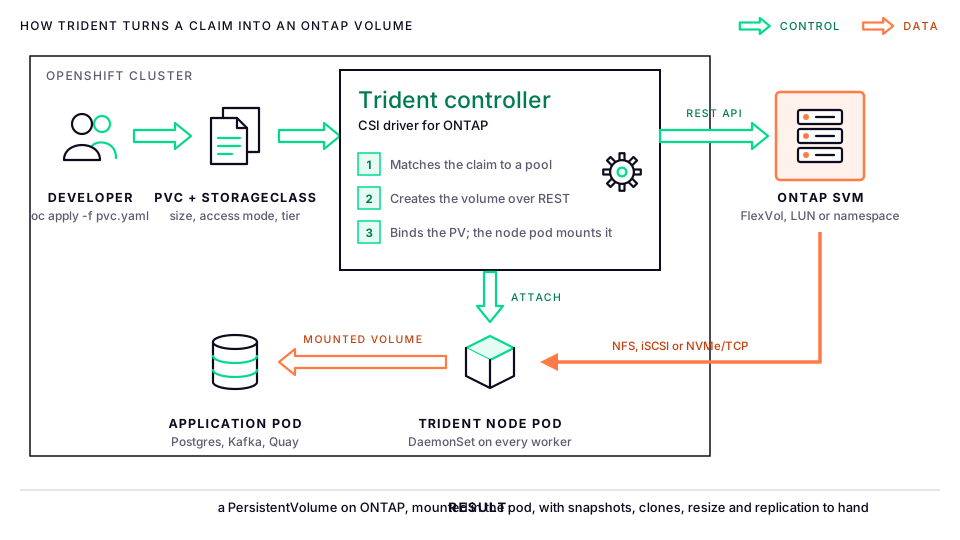
- A developer creates a PersistentVolumeClaim that names a StorageClass, a size and an access mode. Nothing in the claim mentions NetApp.
- The StorageClass carries Trident parameters: which backend type to use, which labels a backend must match, the filesystem type, and policies such as QoS, snapshot schedule or encryption.
- The controller picks a backend and a storage pool (an aggregate, or a virtual pool the administrator defined), creates the FlexVol, LUN or NVMe namespace through ONTAP's REST API with the configured prefix, and creates the PersistentVolume.
- When the pod is scheduled, the node pod on that worker connects to the SVM's data LIF, formats the device if it is new, mounts it and reports back to the kubelet.
- From then on Kubernetes objects drive ONTAP features: a
VolumeSnapshotbecomes an ONTAP Snapshot copy, a PVC cloned from another PVC becomes a FlexClone, a larger size in the claim becomes a volume resize, and aTridentMirrorRelationshipbecomes a SnapMirror relationship to the DR site.
Drivers and protocols
Trident's ONTAP drivers decide what ONTAP object backs each PersistentVolume. Choosing the right one is most of the design work.
| Driver | Protocol | What each PV becomes | When to use it |
|---|---|---|---|
ontap-nas |
NFS, SMB | A FlexVol per PV | The default for shared (RWX) storage, databases that want NFS, and OpenShift Virtualization disks |
ontap-nas-economy |
NFS, SMB | A qtree inside a shared FlexVol | Only when the volume count would exceed ONTAP's FlexVol limits; no replication or mobility |
ontap-nas-flexgroup |
NFS, SMB | A FlexGroup spanning aggregates | Very large or very hot datasets, such as AI training data and media |
ontap-san |
iSCSI, FC, NVMe/TCP | A LUN or NVMe namespace in its own FlexVol | Block storage for databases, message brokers and VMs; the lab's default class |
ontap-san-economy |
iSCSI | A LUN in a shared FlexVol | High LUN counts where per-volume features matter less |
The same Trident also drives Amazon FSx for NetApp ONTAP, Azure NetApp Files, Google Cloud NetApp Volumes, Cloud Volumes ONTAP, the ASA and ASA r2 all-flash arrays, and NetApp Element. The ONTAP labs here transfer directly to FSx and Cloud Volumes ONTAP, because they are ONTAP.
The lab environment
Every lab in this series is run on our OpenShift lab cluster before it is published. The environment at the time of writing:
| Component | What we run |
|---|---|
| OpenShift | 4.22 on Red Hat Enterprise Linux CoreOS 9, a three-node compact cluster |
| Trident | 26.06.2, installed by the Trident operator through a TridentOrchestrator |
| Storage | ONTAP Select, one SVM with an NFS 4.1 data LIF and an iSCSI data LIF |
| Backends | One ontap-nas and one ontap-san backend on that SVM, REST enabled, credentials in a Secret, volumes prefixed dr_ |
| StorageClasses | ontap-nas and ontap-san (default, ext4), plus a VolumeSnapshotClass |
| Trident Protect | 26.06.0 in the trident-protect namespace |
Trident is not a demo on this cluster. It holds the volumes behind Red Hat Quay, our Streams for Apache Kafka brokers, the Crunchy Postgres clusters, Data Grid, OpenShift Pipelines and the compliance and observability operators, which is why the later labs can use real workloads rather than busybox pods. The Kafka and Crunchy Postgres series run on these same StorageClasses, and the NetApp storage series covers ONTAP Select itself.
The twelve labs
The labs are in order. The first five build the platform, the next three run it, and the last four harden and extend it. Each lab ends with something you can show: a working backend, a restored volume, a dashboard.
Lab 1. Foundations and environment setup
Where Kubernetes storage objects come from and where Trident fits between them and ONTAP.
- Kubernetes storage concepts: PersistentVolume, PersistentVolumeClaim, StorageClass, the CSI interface and dynamic provisioning
- Trident architecture: operator, controller, node pods, CSI sidecars and the CRDs
- Lab environment: the OpenShift cluster, ONTAP Select or an AFF/FAS system, networking to the SVM and the prerequisites on each side
- Installing
tridentctland verifying cluster access
Lab 2. Installing Trident
Three ways to install, when to use each, and how to keep Trident current.
- Installing with the Trident operator and a
TridentOrchestratorresource, including the OpenShift certified operator from OperatorHub - Installing with the Helm chart and values overrides
- Installing with
tridentctlfor comparison, and generating manifests for disconnected clusters withtridentctl imagesand a mirror registry - Verifying pods, CRDs, the CSI driver registration and the installed version
- Upgrade and uninstall paths, and why the
TridentOrchestratorresource is kept during a reinstall
Lab 3. ONTAP NAS backends (NFS)
The first backend, and the NFS driver family.
- Preparing ONTAP: the SVM, data LIF, export policy and aggregate access
- Configuring the
ontap-nasbackend with aTridentBackendConfigand a credentials Secret - Configuring
ontap-nas-economyandontap-nas-flexgroup, and comparing their use cases - Backend secrets, credential rotation and certificate-based authentication
- Troubleshooting a backend that reports offline
Lab 4. ONTAP SAN backends (iSCSI and NVMe/TCP)
Block storage, which needs the worker nodes prepared as well as ONTAP.
- Preparing worker nodes:
iscsid,multipathdwithfind_multipaths no, the NVMe host tools, and Trident's iSCSI self-healing - Configuring the
ontap-sanandontap-san-economybackends - igroup management and bidirectional CHAP authentication
- NVMe/TCP backends with
sanType: nvme, node verification, and where Fibre Channel fits - Block volume mode against filesystem mode, and what each means for a database and for a VM
Lab 5. StorageClasses and provisioning
Turning backends into a menu that developers can choose from.
- Mapping StorageClasses to backends with selectors and storage pools
- Virtual pools and labels for tiers: gold, silver and bronze on one SVM
- Parameters:
fsType, snapshot policies, export policies, QoS policies and encryption - The default StorageClass, reclaim policies and volume binding modes
- Provisioning the first PVCs and inspecting the created ONTAP volumes with
tridentctl get volume
Lab 6. Day-to-day volume operations
The requests that arrive every week once applications are running.
- Volume expansion for NFS and iSCSI volumes
- Access modes: ReadWriteOnce, ReadWriteMany, ReadWriteOncePod, and which drivers give which
- Importing existing ONTAP volumes with
tridentctl import, managed and unmanaged, keeping the original name with--no-rename - Custom volume names and labels on ONTAP, sharing a ReadWriteMany NFS volume across namespaces with a
TridentVolumeReference, and the inspection commands - StatefulSets with
volumeClaimTemplates
Lab 7. Snapshots and clones
ONTAP's strongest features, exposed as Kubernetes objects.
- The snapshot controller and CRDs on OpenShift, and the
VolumeSnapshotClass - On-demand
VolumeSnapshotobjects and what they are on ONTAP - Restoring a PVC from a snapshot
- Cloning a PVC from an existing PVC, including across StorageClasses on the same backend
- In-place restore with
TridentActionSnapshotRestore, read-only clones, and volume group snapshots for applications with several volumes
Lab 8. Data protection and disaster recovery
Getting the data to a second site and getting the application back.
TridentMirrorRelationshipwith SnapMirror between peered ONTAP clusters, andTridentActionMirrorUpdatefor an on-demand update- Planned and unplanned failover: promoting the secondary PVC and re-establishing the mirror afterwards
- Volume replication between two OpenShift clusters
- Backup and restore of Trident's own state and CRDs
- Trident Protect: application-aware snapshots, Kopia backups to an S3 AppVault such as StorageGRID, schedules, restores to another namespace or cluster, execution hooks and
AppMirrorRelationship
Lab 9. Security and multi-tenancy
Running one Trident for many teams without them seeing each other's data.
- An SVM per tenant, backends scoped to namespaces, and Trident's RBAC
- Kerberos for NFS, including in-flight encryption
- iSCSI CHAP and NVMe authentication
- RBAC for Trident resources and
TridentBackendConfigobjects in tenant namespaces - Encryption at rest with NetApp Volume Encryption and aggregate encryption, LUKS for iSCSI volumes, and the pod security standards Trident needs on OpenShift
Lab 10. Performance and quality of service
Measuring, then promising.
- Applying ONTAP adaptive QoS policies through StorageClass parameters
- Measuring throughput and latency with
fioon NFS, iSCSI and NVMe/TCP volumes - FlexGroup volumes for parallel AI and ML workloads
- Tuning NFS mount options including
nconnect - Capacity planning with the economy drivers, autogrow policies, and ONTAP balanced placement across aggregates
Lab 11. Monitoring and troubleshooting
Seeing Trident the way the operations team will.
- Trident's Prometheus metrics, a ServiceMonitor for the
trident-csiservice, and Grafana dashboards next to the kubelet's volume metrics - Log collection with
tridentctl logsand debug levels - Common failures: mount errors, PVCs stuck in Pending, backend credential problems and nodes that have not registered
- Node preparation checks and CSI node readiness
- AutoSupport bundles and correlating Trident events with ONTAP events
Lab 12. Advanced and platform integrations
Where Trident goes next on our platform.
- Trident for OpenShift Virtualization: VM disks on
ontap-nasandontap-san, ReadWriteMany block for live migration, hosted control planes, and automated workload failover when a node is lost - Trident with Amazon FSx for NetApp ONTAP, Azure NetApp Files and Google Cloud NetApp Volumes
- Windows nodes with SMB volumes
- GitOps for backends and StorageClasses with OpenShift GitOps
- Capstone: a Crunchy Postgres cluster and an AI training job on tiered Trident storage, with snapshots on a schedule and replication to the second cluster
How to use this series
Labs 1 to 5 assume nothing beyond cluster-admin on an OpenShift cluster and administrator access to an SVM; an ONTAP Select or ONTAP simulator instance is enough. Labs 6 to 12 assume the backends and StorageClasses from Lab 5 are in place. Every command is run against our lab cluster before it is published, and each lab names the Trident, OpenShift and ONTAP versions it was tested with.
If you are choosing storage for an OpenShift platform or an AI platform, or planning its disaster recovery, this is the series to read first, and our Kubernetes operations team runs these environments for clients. Talk to us if you want the labs run on your own cluster.